Meta's Conversions API explained for non-developers
What the Conversions API solves, how to avoid counting a purchase twice with event_id, and what helps Meta recognize who bought.

Contents
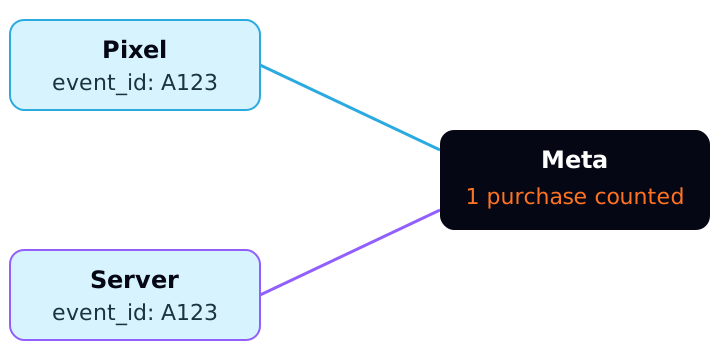
The Conversions API (CAPI) is a channel for your server to send business events, such as a purchase or a lead, to Meta without relying only on the browser. It does not replace the Pixel: Meta recommends using both at the same time, sharing the same events. So that Meta does not count the same purchase twice, each event carries the same event_id in both channels.
What the Conversions API solves
The Pixel runs in the person's browser. CAPI runs on your server, which already knows when an order was paid, when a lead was qualified or when a deal closed in the CRM. Meta's documentation describes CAPI as a connection between an advertiser's marketing data and Meta, from servers, websites, apps and CRMs, used to improve targeting, lower cost per result and measure outcomes.
One point that helps remove the fear: according to the documentation, server events are processed like events sent through the Pixel. They serve measurement, reporting and optimization in the same way. There is no separate "conversion type" for CAPI.
That does not mean CAPI fixes every measurement problem. It sends what your server knows. If the server records the wrong event, Meta receives the wrong event.
Pixel and CAPI together, not one instead of the other
The best practices page says: use the Conversions API in addition to the Meta Pixel and share the same events through both tools.
The consequence is direct. If both channels send the same purchase, Meta receives two notifications of the same sale. Without a way to recognize they are the same, the report would show double.
Deduplication: the role of event_id
For Meta to treat two events as one, the documentation asks for these matches:
- the Pixel's
eventIDmust equal CAPI'sevent_id; - the Pixel's
eventmust equal CAPI'sevent_name.
If both keys match and the events were sent to the same Pixel ID within 48 hours, Meta discards the subsequent events. When the content of the two events does not differ meaningfully, the documentation says Meta generally prefers the event received first. The page does not define "differ meaningfully", so do not count on a rule beyond that.
event_id is optional but recommended. The documentation says it can be any unique string you choose, and mentions an order number or transaction ID as good options. If there is no natural identifier, a random value works as long as it is the same in the browser event and the server event.
There is a plan B, but it is more fragile
Meta also describes deduplication by event_name plus fbp and/or external_id. fbp is the browser identifier, from the _fbp cookie; external_id is your own identifier for the person. The documentation itself lists a limitation: the server event is not discarded if no browser event was received in the last 48 hours, even if an identical browser event arrives after the server event.
And an important warning: deduplication does not happen when you use a single source, browser only or server only. It is for the Pixel plus CAPI pair.
A hypothetical example of the damage
The numbers below are made up to illustrate the math. A store spends R$ 10,000 on ads in a month and sells 100 orders of R$ 300, which gives R$ 30,000 in revenue and a ROAS of 3.0 (30,000 ÷ 10,000). Suppose the Pixel records 70 of those orders and the server sends all 100. Without a shared event_id, Meta could receive 170 purchases.
Reality
- Purchases
- 100
- Revenue
- R$ 30,000
- ROAS
- 3.0
Pixel and CAPI without
event_id(hypothetical)- Purchases
- 170
- Revenue
- R$ 51,000
- ROAS
- 5.1
Pixel and CAPI with
event_id- Purchases
- 100
- Revenue
- R$ 30,000
- ROAS
- 3.0
| Scenario | Purchases | Revenue | ROAS |
|---|---|---|---|
| Reality | 100 | R$ 30,000 | 3.0 |
Pixel and CAPI without event_id (hypothetical) | 170 | R$ 51,000 | 5.1 |
Pixel and CAPI with event_id | 100 | R$ 30,000 | 3.0 |
The math checks out: 170 × R$ 300 = R$ 51,000, and 51,000 ÷ 10,000 = 5.1. A ROAS inflated by 70% (5.1 versus 3.0) would lead to budget decisions based on a return that does not exist. That is why you check deduplication before any other optimization.
The fields Meta asks for in each event
Each CAPI event has a set of fields. According to the documentation, the main ones are:
event_name: required, the name of the standard or custom event.event_time: required, in Unix seconds, in GMT.action_source: required, says where the conversion happened. Values includewebsite,app,email,phone_call,chat,physical_store,system_generated,business_messagingandother.event_source_url: required for website events.client_user_agent: required for website events sent through CAPI.event_id: optional, but recommended.
Two rules deserve attention. First, event_time can be up to 7 days before you send it. If a single event in the request is older, the whole request fails and no events are processed. In a batch, one late event takes down all of them. Second, by using CAPI you state that action_source is correct to the best of your knowledge; for offline events, the value should not be website.
On timing, the documentation says you can share events in real time or in batches close to real time. It gives no deadline in minutes, so the practical rule is the 7-day limit on event_time and the 48-hour deduplication window.
Customer data and match quality
To use an event for attribution and ad delivery optimization, Meta needs to associate it with a person. The documentation says only matched events serve these two uses, and that sending more customer information parameters may help increase Event Match Quality.
The parameters include email (em), phone (ph), name (fn, ln), fbp, fbc (from the _fbc cookie, which stores the click identifier), external_id, client_ip_address and client_user_agent. The format rules are strict:
em,ph,fn,lnand other personal fields must be hashed with SHA-256 before sending.- Before hashing, the email is trimmed of surrounding spaces and lowercased. The phone loses symbols, letters and leading zeros and includes the country code: Meta's example turns (650) 555-1212 into
16505551212. client_ip_address,client_user_agent,fbpandfbcare not hashed. The IP must be the real one, a valid IPv4 or IPv6 address.external_idhas hashing recommended, not required.
The documentation also warns that overly broad combinations, such as name plus gender (fn + ge), are invalid for matching. Sending many weak fields does not help: one correct email or phone is worth more.
Where Relator fits in
Relator Digital connects Meta, Google Ads, GA4 and the client's CRM in a single base, and matches won deals in HubSpot or RD Station CRM with the campaign that brought the lead. It does not send events to Meta through CAPI. Its role here is different: helping you check whether what Meta reports is consistent with the revenue the CRM records.
How to apply
- 1.List the events that matter (purchase, lead, qualified lead) and confirm the Pixel already sends them.
- 2.Pick one
event_idper event, preferably the order number or the lead identifier, and use the same value in the Pixel and in CAPI. - 3.Keep
event_nameidentical in both channels. - 4.Send
action_source,event_source_urlandclient_user_agenton every website event. - 5.Add
emandphnormalized and hashed with SHA-256 when you have a legal basis, plusfbpandfbcwhen they exist. - 6.Never send an event with an
event_timeolder than 7 days: separate the late ones before building the batch. - 7.For a week, compare Meta's purchases with your server's. If Meta shows far more, suspect deduplication.
Sources
All checked on October 15, 2026. Left out, because we could not read Meta's Help Center page, are the Event Match Quality score and scale, and the Pixel sample code with eventID.
- Meta for Developers, Conversions API: what the API does and that events are processed like Pixel events.
- Meta for Developers, Best Practices: use alongside the Pixel, required fields and match quality.
- Meta for Developers, Deduplicate Pixel and Server Events:
event_idandevent_namerules, 48-hour window and thefbpplan B. - Meta for Developers, Server Event Parameters:
event_timewith a 7-day limit,action_sourceandevent_source_url. - Meta for Developers, Customer Information Parameters: SHA-256 hashing and normalization.
This article is also available as Markdown, for agents and LLMs: view .md version