Campaign naming: the name is your first report
A name with fixed-position fields becomes a filter, a grouping and a report. See a simple taxonomy, the separators and how to validate the standard.
Contents
A good campaign name is a set of fields in fixed positions, split by a character that never appears inside the fields. That turns the name from a label into data: you can filter, group and sum by objective, audience or offer without opening campaigns one by one. The format that works in most accounts has four fields: objective_audience_offer_period.
A name with structure is a report that is already built
An ad account grows by accumulation. Someone duplicates a campaign and writes "copy", someone else creates "New campaign 2", a freelancer uses their own standard. Months later, the question "how much did we spend on remarketing this quarter?" means opening campaign after campaign, because the name does not say what the campaign is.
When the name has fixed-position fields, the same question becomes a mechanical operation: split the name into fields and sum the column. This works in a spreadsheet, in SQL or in any report that lets you group by part of a text. The organizing work happens once, when the campaign is created, and not every time someone needs a number.
Position matters more than the word
The core rule is simple: each field takes one position, and the position defines the meaning. Someone reading sales_cold_summer-collection_oct26 knows the first field is the objective even without having seen the list, as long as the convention is written down.
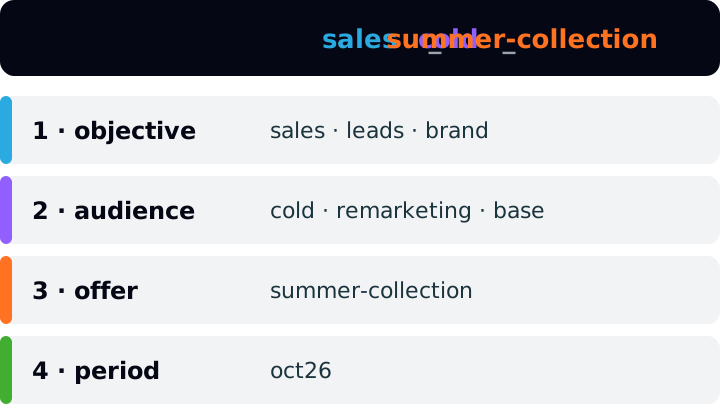
A working suggestion, not a platform rule:
1
- Field
- objective
- How to fill it
- closed list
- Examples
sales,leads,traffic,brand
2
- Field
- audience
- How to fill it
- closed list
- Examples
cold,remarketing,base
3
- Field
- offer
- How to fill it
- short lowercase text
- Examples
summer-collection,seo-ebook
4
- Field
- period
- How to fill it
- abbreviated month + two-digit year
- Examples
oct26
| Position | Field | How to fill it | Examples |
|---|---|---|---|
| 1 | objective | closed list | sales, leads, traffic, brand |
| 2 | audience | closed list | cold, remarketing, base |
| 3 | offer | short lowercase text | summer-collection, seo-ebook |
| 4 | period | abbreviated month + two-digit year | oct26 |
Two decisions deserve attention. The first is to keep fields 1 and 2 as closed lists: they are the ones you will group by, and a new spelling (sale, conversion, revenue) breaks the grouping. The second is to put the period at the end, and not the exact day: the month is enough to locate the campaign, and a full date only makes the name longer without helping any report.
One separator between fields, another inside a field
The most common mistake in a standard is using the same character for everything. If the underscore separates the fields and also appears inside the offer (summer_collection), the name suddenly has five parts instead of four, and any position-based reading comes out wrong.
The fix is to reserve each character for one job:
_(underscore) separates fields. It never appears inside a field.-(hyphen) separates words inside a field:summer-collection.- Lowercase only, no spaces and no accents. UTM parameter values are case sensitive (see the UTM section), and a name that mixes
Coldandcoldis born with two values.
The math: what the standard delivers
A hypothetical example. A store has six active campaigns in October, all named by the standard, with the spend below.
sales_cold_summer-collection_oct26- Spend
- R$ 12,000
sales_remarketing_summer-collection_oct26- Spend
- R$ 4,500
leads_cold_seo-ebook_oct26- Spend
- R$ 6,000
leads_remarketing_seo-ebook_oct26- Spend
- R$ 1,500
sales_cold_free-shipping_oct26- Spend
- R$ 3,000
brand_cold_institutional_oct26- Spend
- R$ 2,000
Total
- Spend
- R$ 29,000
| Campaign | Spend |
|---|---|
sales_cold_summer-collection_oct26 | R$ 12,000 |
sales_remarketing_summer-collection_oct26 | R$ 4,500 |
leads_cold_seo-ebook_oct26 | R$ 6,000 |
leads_remarketing_seo-ebook_oct26 | R$ 1,500 |
sales_cold_free-shipping_oct26 | R$ 3,000 |
brand_cold_institutional_oct26 | R$ 2,000 |
| Total | R$ 29,000 |
Summing by objective (first field): sales = 12,000 + 4,500 + 3,000 = R$ 19,500 (67.2% of the total); leads = 6,000 + 1,500 = R$ 7,500 (25.9%); brand = R$ 2,000 (6.9%). The three parts add up to R$ 29,000.
Now by audience (second field): cold = 12,000 + 6,000 + 3,000 + 2,000 = R$ 23,000 (79.3%); remarketing = 4,500 + 1,500 = R$ 6,000 (20.7%). Without opening a single campaign, you know that almost eight out of ten reais went to a cold audience. With names like "New campaign 2" and "Black_Friday_FINAL_v3", that answer would need a hand-built lookup spreadsheet.
Read the name with code, not by eye
A standard nobody checks falls apart within weeks. The cheapest way to keep it is a function that reads the name and rejects what does not fit. A sketch in TypeScript:
const OBJECTIVES = ['sales', 'leads', 'traffic', 'brand'] as const
const AUDIENCES = ['cold', 'remarketing', 'base'] as const
const SLUG = /^[a-z0-9]+(-[a-z0-9]+)*$/
const PERIOD = /^(jan|feb|mar|apr|may|jun|jul|aug|sep|oct|nov|dec)\d{2}$/

function parseCampaignName(name: string) {
  const parts = name.split('_')
  if (parts.length !== 4) return { ok: false as const, error: 'needs 4 fields' }
  const [objective, audience, offer, period] = parts
  if (!OBJECTIVES.includes(objective as never)) return { ok: false as const, error: 'objective not in list' }
  if (!AUDIENCES.includes(audience as never)) return { ok: false as const, error: 'audience not in list' }
  if (!SLUG.test(offer)) return { ok: false as const, error: 'offer in wrong format' }
  if (!PERIOD.test(period)) return { ok: false as const, error: 'period in wrong format' }
  return { ok: true as const, objective, audience, offer, period }
}
With it, sales_cold_summer-collection_oct26 passes; Black_Friday_FINAL_v3 fails (objective not in the list); leads_Cold_seo-ebook_oct26 fails (uppercase letter); and sales_cold_summer_collection_oct26 fails for having five parts. The same function serves a weekly review of the account's names and the spreadsheet that builds the name before the campaign is created. What matters is that the lists and formats live in one place.
The campaign name and the UTM are the same data
Google Analytics documentation describes utm_campaign as the campaign identifier (product, slogan, promo code) and says parameter values are case sensitive: utm_source=google is different from utm_source=Google. The consequence for the name is direct. If the name in the ad manager is sales_cold_summer-collection_oct26 and the UTM is Summer_Collection, you have two vocabularies for the same campaign, and joining spend with sessions becomes manual translation.
The suggestion is to use the campaign name as the utm_campaign value, identical. That way a single text links spend (which comes from the platform) to behavior on the site (which comes from GA4). The article on UTMs without the mess covers the convention for the other parameters and URL validation.
One caution: if the UTM was typed by hand into the URL, renaming the campaign in the ad manager does not change the UTM. Renamed it? Update the URL too.
Each level says only what belongs to it
Accounts have three levels: campaign, ad set (ad group in Google Ads) and ad. The classic mistake is repeating the campaign name in the lower levels. It fills the columns, overflows the screen and adds no information, because whoever sees the ad already sees the campaign next to it.
A split that works:
- Campaign: what you want and for whom, as in the standard above.
- Ad set or group: the slice inside the campaign. For example,
interest-fashionorlookalike-buyers, without repeating the objective. - Ad: what changes from one ad to another, such as
video-social-proof_v2orcarousel-price_v1.
On length: the technical limit is generous. The Google Ads API documentation sets the name of a campaign and of an ad group at 256 characters. The practical limit is another one: what fits in your report column without being cut off. With four short fields, the name stays under 50 characters, and that is enough.
What does not go in the name
- Budget and bid. They change during the campaign and the name goes stale.
- Version words such as "final", "new", "copy", "test2". If you need to version ads, use
v1,v2on the last level and only there. - Personal data of customers or people. The name appears in reports, exports and third-party tools.
- Full date. The month is enough; exact dates stay in the platform's own reports.
Changing the standard without losing history
If the account already has hundreds of off-standard campaigns, renaming everything at once usually costs more than it is worth. A safer approach: the standard applies to everything created from now on, and the old campaigns get a lookup table (old name, name in the standard) kept in the report spreadsheet. Rename the old ones only when you are editing the campaign anyway, and update the UTM along with it.
If you use Relator Digital, the report shows real ROAS by campaign and by channel, joining CRM revenue with the campaign that brought the lead. The clearer the campaign name, the easier it is to read that table and compare similar campaigns, but the standard itself does not depend on any tool.
How to apply
- 1.Pick the fields. Start with four: objective, audience, offer and period.
- 2.Close the lists for the fields you will group by (objective and audience) and write down the format of the other two.
- 3.Define the two separators: underscore between fields, hyphen inside a field. Write down that the underscore never appears inside a field.
- 4.Write the convention in a document with two real examples and one wrong example, and give it an owner and a review date.
- 5.Build a spreadsheet that generates the name from dropdown lists, or use a validation function like the one above, before any campaign is created.
- 6.Use the same text in
utm_campaign. - 7.Once a week, run the function over the account's names and fix what falls outside the standard.
- 8.For history, keep a lookup table and rename the old campaigns gradually.
Sources
All checked on October 8, 2026.
- Google Ads API, System limits: campaign and ad group names up to 256 characters.
- Google Analytics, URL builders: Collect campaign data with custom URLs: description of
utm_campaign, case-sensitive parameter values and the three recommended parameters.
This article is also available as Markdown, for agents and LLMs: view .md version