Google Ads enhanced conversions: when they are worth it
How enhanced conversions work for web and for leads, what to send hashed, what the account gains and where consent comes in.
Contents
Google Ads enhanced conversions add first-party customer data, such as an email address, sent hashed, to the conversion your tag already records. They are worth it when you already measure conversions correctly and want Google to tie more of them to ad interactions, or when the real sale happens outside the site, as with a lead that closes in the CRM. They do not replace the conversion tag, do not fix a badly configured event and do not remove the need for consent.
What they are, in one sentence
Google's Help page defines enhanced conversions for web as a supplement: they "supplement" the conversion you already measure by sending hashed first-party conversion data. Google uses that data to match the customer to the Google accounts that were signed in when they engaged with an ad. According to the documentation, the goal is to improve measurement accuracy and support stronger automated bidding, adding to the existing data rather than replacing it.
One point the page makes clear: Google only reports "privacy-safe" conversions. In other words, the focus is on measuring conversions, not on identifying people for the advertiser.
Web or leads: which one is your case
The documentation separates the two versions by where the sale happens.
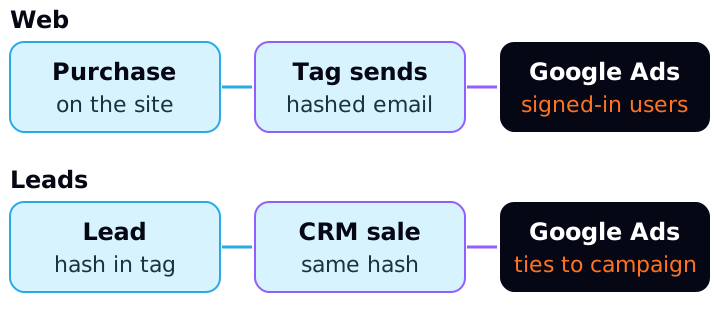
Web. For sales and events that happen on the site, such as a purchase in an online store. When the person converts, the tag sends the customer data captured on the page, already hashed.
Leads. For sales that happen off the site but began with a lead or visitor from it. The documentation's own example is an online inquiry about an apartment that closes later, offline. The tag takes the form data (email or phone, hashed) to Google. When the lead becomes a sale, you import the offline conversion with the same hashed data. Google matches both ends and attributes the sale to the campaign.
The page describes the leads version as an upgrade of offline conversion import. If you already import offline conversions with the GCLID (Google Ads' click identifier), the documentation advises continuing to send the GCLID whenever possible, to maximize accuracy. Without a tag collecting the data, the GCLID is required.
Two dates appear in the Help pages and are worth checking in your account. Since April 2026, web and leads share a single on/off setting, and existing users are migrated automatically. And the leads page states that, starting June 15, 2026, offline conversion imports and enhanced conversions for leads uploads are migrated to the Data Manager API.
What to send and how to prepare it
For web, the documentation requires at least one of these sets:
- an email (the preferred field); or
- an address with first name, last name, postal code and country required (street, city and region are optional).
A phone number can accompany the email or the name and address pair, but does not count on its own.
Before sending, the data goes through SHA-256 hashing, described by Google as a one-way algorithm. The tag does this for you. If you choose to normalize and hash on your own, for example when sending through the API, the page asks you to:
- 1.remove leading and trailing whitespace;
- 2.convert the text to lowercase;
- 3.format phone numbers in the E.164 standard;
- 4.remove the periods before the domain in
gmail.comandgooglemail.comaddresses; - 5.apply SHA-256 hashing in hexadecimal format.
The reason for normalizing is simple: Ana@Example.com and ana@example.com are different texts and would produce different hashes. Without normalizing, Google could not recognize them as the same person.
In the Google tag, the documentation lists three ways to capture the data: automatic detection, CSS selectors or JavaScript variables, or a code snippet. You can combine them, and the code snippet takes priority. There is also the path through Google Tag Manager and through the Google Ads API. Data sent through a method different from the one selected in Google Ads may not be processed.
What the account gains, in money
Google does not publish a typical gain figure. What exists is an impact card: after training, which the page says takes up to 30 days, Google Ads shows the start date, the campaign type and the percentage of reported conversions that were affected. That card stays visible for 30 days.
To understand the effect, a hypothetical example. An account spends R$ 20,000 in a month and reports 400 conversions: R$ 50.00 per conversion (20,000 ÷ 400). Suppose 32 of those 400 are in the report only because of enhanced conversions. Without them, the account would show 368 conversions, and the apparent cost per conversion would be R$ 54.35 (20,000 ÷ 368). Sales did not change; the report simply started seeing more of them.
Without enhanced conversions
- Spend
- R$ 20,000
- Reported conversions
- 368
- Cost per conversion
- R$ 54.35
With enhanced conversions
- Spend
- R$ 20,000
- Reported conversions
- 400
- Cost per conversion
- R$ 50.00
| Scenario (hypothetical) | Spend | Reported conversions | Cost per conversion |
|---|---|---|---|
| Without enhanced conversions | R$ 20,000 | 368 | R$ 54.35 |
| With enhanced conversions | R$ 20,000 | 400 | R$ 50.00 |
The practical lesson: when you turn it on, the reported number may rise without the business having sold more. Write down the activation date so you do not compare a month before and after as if it were campaign performance.
For leads, the gain is of a different kind. Imagine an account that spends R$ 8,000 and generates 200 leads, of which 20 close a deal in the CRM. Cost per lead is R$ 40 (8,000 ÷ 200), but cost per sale is R$ 400 (8,000 ÷ 20). Without importing the sale, Google only sees the lead. With the import, it sees which click became a sale.
Consent and policy: what is your responsibility
Google's customer data policy requires the advertiser, among other points, to:
- disclose to customers that you share their information with third parties for ad measurement;
- obtain consent for that sharing where the law requires it;
- comply with applicable data protection laws;
- not upload information prohibited by law, including data about minors.
The same policy says conversions related to sensitive categories, such as health, religion or political affiliation, cannot be used in enhanced conversions. If you serve clinics or other sensitive sectors, check this before turning it on.
On Consent Mode: the setup page says that, with it implemented, the ads cookie is subject to the ad_storage consent status. Google's tag guide defines ad_user_data as consent for sending user data related to advertising to Google. When consent is denied, the documentation describes Consent Mode's conversion modeling: in advanced mode, tags send cookieless pings, and Google uses them to model metrics, provided there is a minimum amount of data.
The documentation I consulted does not say explicitly how enhanced conversions behave for each combination of denied signals. So do not promise the client a number. Set up the banner and Consent Mode, confirm the legal basis and the privacy notice with whoever is responsible for them, and treat consent as part of the project, not as a technical detail.
When it is worth it, and when to wait
Worth considering when:
- you have well-defined purchase or lead conversions, with the tag already working;
- the form or checkout reliably captures an email;
- the sale closes off the site and you can export the same email (or phone) from the CRM and, preferably, the GCLID;
- you can explain the privacy notice to the client.
Wait when:
- the conversion tag already counts purchases twice. Use a unique transaction identifier per order: Google says a second conversion with the same
transaction_idis treated as a duplicate and is not counted; - the site collects no email anywhere in the flow;
- the client's sector is in the sensitive categories;
- nobody has defined how to handle consent.
How to apply
- 1.Check that the current conversion is correct: value, currency and a unique transaction identifier per order.
- 2.Pick the case: web (data at purchase) or leads (data at the form and import of the sale).
- 3.Agree the privacy notice and consent with the client before turning it on.
- 4.Turn it on in Google Ads and accept the customer data terms: data collection does not begin before you accept.
- 5.Choose the method: Google Tag Manager, the Google tag or the API.
- 6.Check in Chrome DevTools, Network tab, the
emparameter of the conversion request. It should start withtv.1~emfollowed by a long string. If onlytv.1~emappears, the data was not available when the tag fired. - 7.Open the diagnostics report, available about 72 hours after implementation, and follow the impact card over the next 30 days.
- 8.Note the activation date in your reports so you do not confuse a measurement gain with a campaign gain.
Sources
All checked on October 16, 2026. Left out for lack of an official source: any typical gain percentage, the exact ad_user_data requirement for enhanced conversions and the LGPD analysis.
- Google Ads Help, About enhanced conversions: definition, SHA-256 hashing, normalization and the difference between web and leads.
- Google Ads Help, Set up enhanced conversions for web with the Google tag: minimum data, terms, verification and diagnostics.
- Google Ads Help, Enhanced conversions for web: setup overview: methods and the single on/off setting.
- Google Ads Help, Enhanced conversions for leads: GCLID, offline import and migration to the Data Manager API.
- Google Ads Help, Enhanced conversions for web impact results: up to 30 days of training and the impact card.
- Google Ads Help, Use a transaction ID to minimize duplicate conversions.
- Google Ads Help, Consent mode:
ad_storageand conversion modeling. - Google for Developers, Consent mode on the tag platform: definition of
ad_user_data. - Google Ads policies, Customer data policies: notice, consent and sensitive categories.
This article is also available as Markdown, for agents and LLMs: view .md version