Why Meta, Google Ads and GA4 never show the same number
Attribution windows, the date a sale is recorded and the credit model explain almost the whole gap. Here is how to read all three without fighting any of them.

Contents
Meta, Google Ads and GA4 show different numbers because each one counts only what it managed to see, under its own rules: how long after the ad a sale still counts, which day it lands in the report, and who gets the credit when the person went through more than one channel. None of them is "wrong". They answer different questions, and the real revenue only shows up in the CRM or the store's system.
Each tool counts the sale it saw, its own way
Picture an ordinary purchase. On Monday, the person clicks an Instagram ad and leaves the site. On Wednesday, they search for the brand on Google and click the ad. On Thursday, they buy.
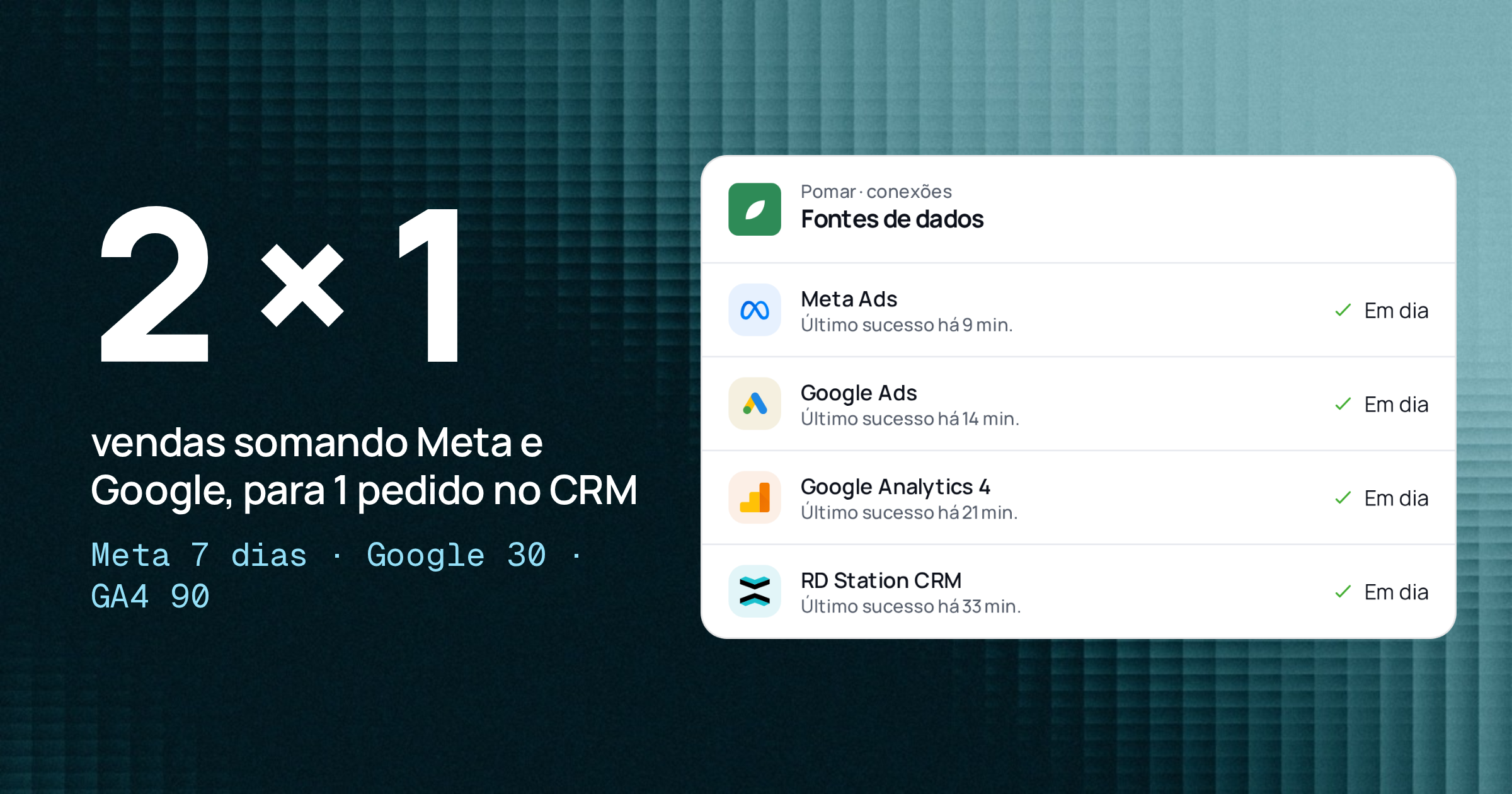
Meta sees a click and a purchase within 7 days: it counts 1 sale. Google Ads sees a click and a purchase within 30 days: it also counts 1. GA4 sees two visits and the purchase, and splits the credit according to its model. The CRM records 1 order on Thursday.
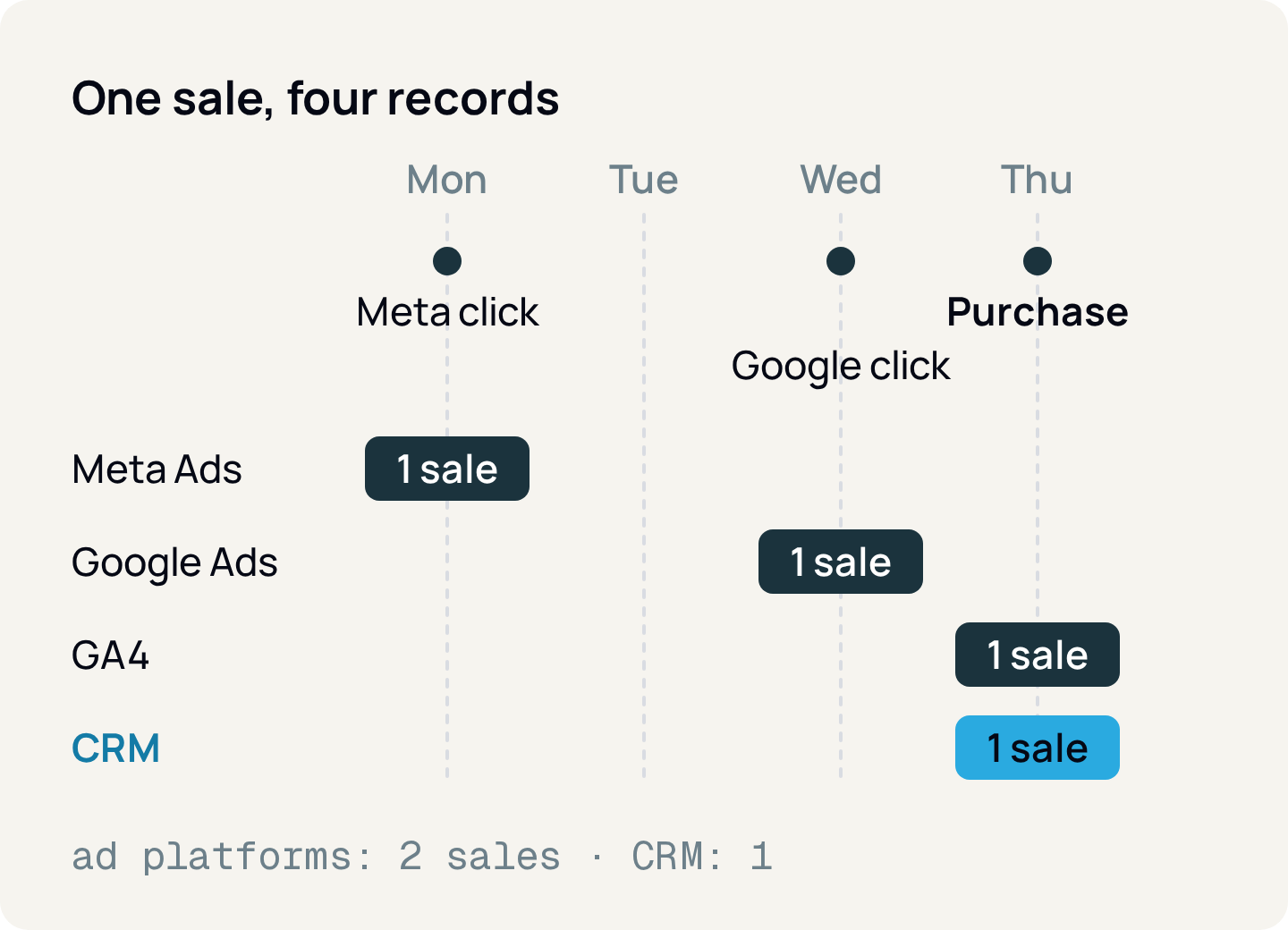
It was one sale. The ad platforms add up to two, on different days. That is the mechanism behind almost every "the numbers don't match".
The attribution window decides who can claim the sale
The attribution window is the period after a click or view during which the platform still credits the sale to the ad.
- Meta Ads: the default is 7 days after a click or 1 day after a view. Video ads can also include 1-day engage-through (the person watched at least 5 seconds or interacted without clicking the link). The window is set at the ad set level.
- Google Ads: the default click window for a new conversion is 30 days (up to 90 in some cases). Views count for 1 day; engaged video views, 3.
- GA4: there is no "ad window", but a lookback window: 30 days for acquisition events, such as first visit, and 90 days for all other key events.
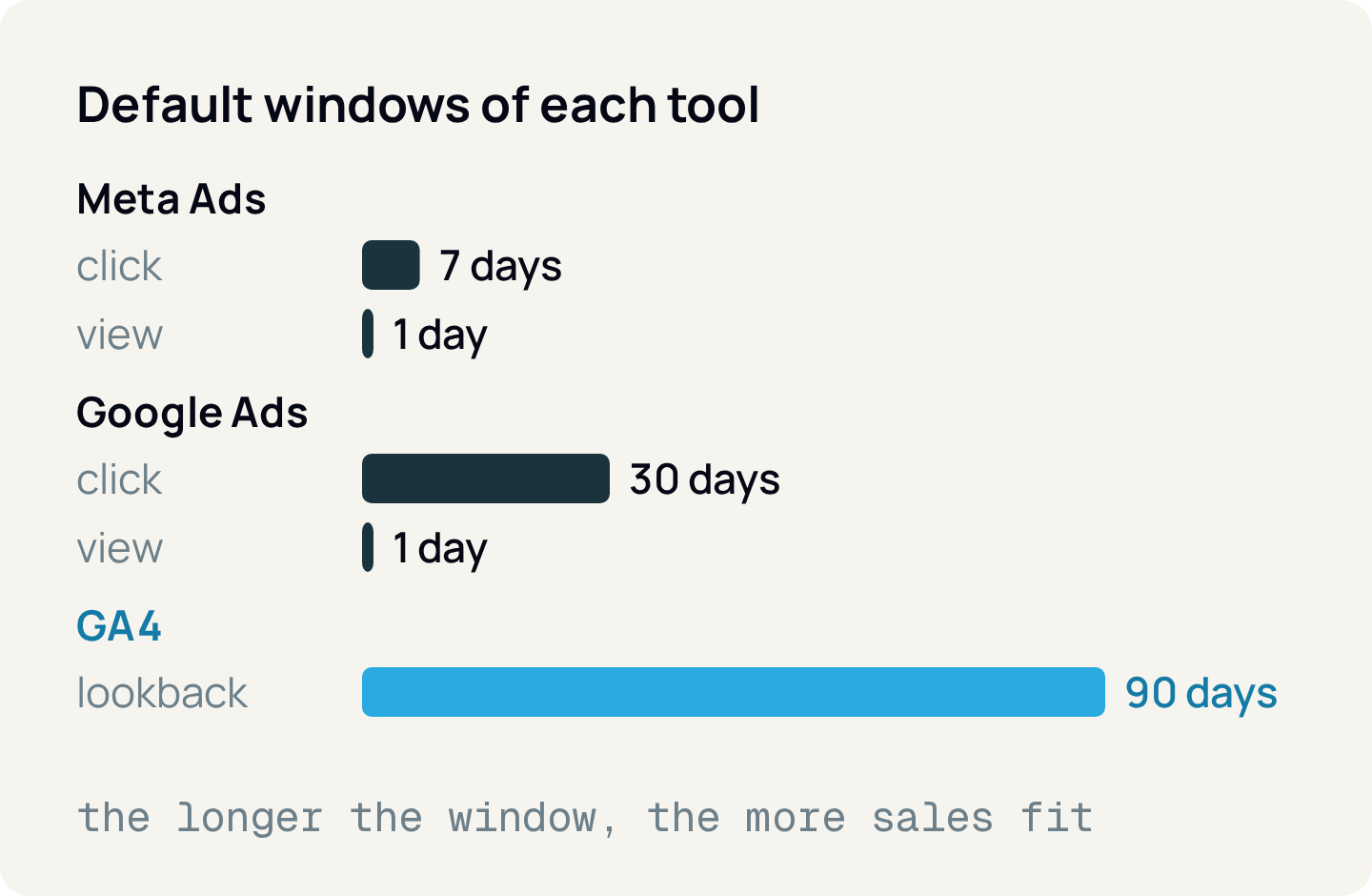
The longer the window, the more sales fit in it. Switching Meta from 7-day to 1-day click drops the number without a single sale going away.
A recent change: since January 12, 2026, Meta's Insights API no longer returns the 7-day and 28-day view windows (7d_view and 28d_view). 1-, 7- and 28-day click, 1-day view and 1-day engaged view remain. A dashboard that pulled 7-day view lost that data and its comparison with history.
Seeing the ad counts as a sale in Meta, but does not show up in GA4
A view-through conversion is one where the person saw the ad, did not click, and bought within the window. Meta includes these sales in its default result.
GA4 only knows where each site visit came from. Someone who saw an Instagram ad and later typed the address shows up as direct traffic. In accounts with high reach and few clicks, this is the biggest difference between Meta and GA4.
Nobody is lying: Meta says the ad may have influenced the purchase; GA4 says the visit that closed it did not come from a Meta click. Both can be true.
The same sale lands on different days
- Meta Ads Manager reports by impression date. If the person saw the ad on Monday and bought on Thursday, the purchase shows up on Monday. In the API, the
action_report_timeparameter lets you request conversion date instead. - Google Ads reports by click date, so cost and conversion sit on the same day. To see it by sale date there are the "by conv. time" columns.
- GA4 and the CRM record the date the purchase event happened.
That is why yesterday's number in the ad platforms keeps growing over the next days: future sales get attributed to past clicks and impressions. The week closed on Monday morning shows less than the same week viewed ten days later.
Ad platforms do not share credit with each other
Inside Meta, the credit goes to the last Meta ad the person clicked or, without a click, to the last one they saw. Inside Google Ads, only Google ads compete. Neither knows the other exists. When the same person clicks on both, both count the whole sale.
GA4 is the only one of the three that splits a sale across channels. Since November 2023 three models remain: data-driven (which distributes credit with machine learning), paid and organic last click, and Google paid channels last click. Check in Admin which one the property uses.
A detail that confuses people: the model only applies to event-scoped dimensions, such as Source, Medium and Campaign. Session dimensions, such as "Session source" in traffic acquisition, do not change with it. That is why two reports in GA4 itself can credit the same channel differently.
Counting, estimation and delay move the total
Count every conversion or just one. In Google Ads, "Every" counts each purchase after the click and "One" counts only one per click (meant for leads). In Meta, attribution comparison lets you choose all conversions or only the first. In GA4, each key event counts once per event or, in the legacy format, once per session.
Modeled conversions. When the person declines cookies, consent mode sends cookieless pings and Google estimates what it did not observe; the Google Ads "Conversions" column adds observed and modeled together. Meta also models what it lost to privacy. The CRM does not estimate: the order either exists or it does not.
Data that changes later. In GA4, the attribution credit of a key event can change for up to 12 days after it is recorded, and some data can arrive up to 7 days late.
Time zone, currency and device add to the gap
Each ad account and each GA4 property has its own time zone and currency. An account on Los Angeles time and a GA4 on São Paulo time cut the day at different hours, and late-night sales jump dates. An account in dollars and a store in reais depend on the exchange rate.
Without User-ID, GA4 identifies each browser by device ID: a click on the phone and a purchase on the computer become two people, and the purchase can land in "direct". Meta measures by person and follows conversions across devices for people who use its accounts.
And do not compare users or sessions with sales: they measure visits. A sale is the purchase event and its revenue.
A reconciled week, with hypothetical numbers
Hypothetical example: a store closed 100 orders in a week, with an average order value of R$ 300, and spent R$ 6,000 on Meta and R$ 4,000 on Google Ads.
CRM / backend
- Sales
- 100
- Revenue
- R$ 30,000
- What this number measures
- Paid orders, by order date
Meta Ads
- Sales
- 62 (48 by click, 14 by view)
- Revenue
- R$ 18,600
- What this number measures
- 7-day click or 1-day view, by impression date
Google Ads
- Sales
- 41
- Revenue
- R$ 12,300
- What this number measures
- 30-day click, by click date, with modeled
Meta + Google Ads
- Sales
- 103
- Revenue
- R$ 30,900
- What this number measures
- More than the CRM: both claim the same sales
GA4, all channels
- Sales
- 92
- Revenue
- R$ 27,600
- What this number measures
- Purchases the site recorded; 8 lost to consent or blockers
GA4, paid social
- Sales
- 22
- Revenue
- R$ 6,600
- What this number measures
- Session last click from Meta
GA4, paid search
- Sales
- 30
- Revenue
- R$ 9,000
- What this number measures
- Session last click from Google
| Source | Sales | Revenue | What this number measures |
|---|---|---|---|
| CRM / backend | 100 | R$ 30,000 | Paid orders, by order date |
| Meta Ads | 62 (48 by click, 14 by view) | R$ 18,600 | 7-day click or 1-day view, by impression date |
| Google Ads | 41 | R$ 12,300 | 30-day click, by click date, with modeled |
| Meta + Google Ads | 103 | R$ 30,900 | More than the CRM: both claim the same sales |
| GA4, all channels | 92 | R$ 27,600 | Purchases the site recorded; 8 lost to consent or blockers |
| GA4, paid social | 22 | R$ 6,600 | Session last click from Meta |
| GA4, paid search | 30 | R$ 9,000 | Session last click from Google |
Meta claims 62 sales, but only 22 had Meta as the last visit in GA4. The gap of 40 is the 14 by view, which GA4 does not see, and 26 sales where the person clicked on Meta and came back another way (Google, direct, email).
ROAS (return on ad spend, revenue divided by spend) changes with the source. By Meta, R$ 18,600 ÷ R$ 6,000 = 3.1. By Google Ads, R$ 12,300 ÷ R$ 4,000 ≈ 3.1. By the business, R$ 30,000 ÷ R$ 10,000 = 3.0, organic included.
Which number to use for each decision
How much the client billed and the total return on media
- Number
- CRM or backend ÷ total spend
- Why
- The only count without duplication
Change creative, audience or budget inside Meta
- Number
- Meta Ads Manager, always with the same window
- Why
- It is the signal the algorithm optimizes on
Adjust bids and keywords on Google
- Number
- Google Ads, by click date
- Why
- Cost and conversion on the same day
Compare channels and reallocate budget
- Number
- GA4 with a fixed model, or lead source in the CRM
- Why
- A single yardstick for every channel
Close the monthly report
- Number
- CRM, plus platforms checked 7 to 12 days later
- Why
- Platform data still changes during that period
| Decision | Number | Why |
|---|---|---|
| How much the client billed and the total return on media | CRM or backend ÷ total spend | The only count without duplication |
| Change creative, audience or budget inside Meta | Meta Ads Manager, always with the same window | It is the signal the algorithm optimizes on |
| Adjust bids and keywords on Google | Google Ads, by click date | Cost and conversion on the same day |
| Compare channels and reallocate budget | GA4 with a fixed model, or lead source in the CRM | A single yardstick for every channel |
| Close the monthly report | CRM, plus platforms checked 7 to 12 days later | Platform data still changes during that period |
The rule of thumb: revenue comes from the CRM, optimization comes from the platform, and channel comparison comes from a single yardstick. Next to each number, state which window and which date it uses.
In Relator Digital, Meta Ads, Google Ads, GA4 and the CRM (HubSpot or RD Station CRM) live in the same base, and the product matches won deals in the CRM with the campaign that brought the lead. That puts real ROAS, calculated with CRM sales, next to what each platform reports.
How to apply
- 1.For each client, write down the window of each Meta ad set, the window and counting of each Google Ads conversion, and the GA4 model.
- 2.Check the time zone and currency of each account, GA4 and the CRM; if they differ, note it in the report.
- 3.Agree in the contract or onboarding that business revenue and ROAS come from the CRM or backend.
- 4.Build the report with one row per source, with the window and date of each number.
- 5.Close the month only after 7 to 12 days, or mark the last days as partial.
- 6.Do not add conversions from different platforms. If you need a total, use the CRM.
- 7.If the gap shifts to a new level, first check whether someone changed the window, counting, model or pixel.
Sources
- Meta for Developers: Ads Insights API metric availability updates (Oct. 2025)
- Meta for Developers: Ad Account Insights
- Meta Business Help Center: How conversions are attributed in Commerce Manager
- Meta Business Help Center: Set up engage-through in Meta Ads Manager
- Meta Business Help Center: About Meta's modeled conversions
- Meta Business Help Center: Conversion count differences with third-party tools
- Meta Business Help Center: Compare attribution settings in Meta Ads Manager
- Google Ads Help: About conversion windows
- Google Ads Help: About conversion counting options
- Google Ads Help: Understand conversions by time with new columns
- Google Ads Help: About modeled conversions
- Google Ads Help: About consent mode
- Analytics Help: Get started with attribution
- Analytics Help: Select attribution settings
- Analytics Help: Change the counting method of key events
- Analytics Help: Data freshness
- Analytics Help: Reporting identity
About the author
João Vitor Moitinho
João Vitor Moitinho is the founder of Relator Digital. A computer engineer, he works on growth, measurement and martech, and writes here about what he learns building reports for performance agencies.
João Vitor Moitinho on LinkedInThis article is also available as Markdown, for agents and LLMs: view .md version