Consent Mode v2 and LGPD: what changes in your numbers
What Consent Mode sends to Google, when modeling kicks in, how declined cookies affect conversions and how to explain the drop to a client.

Contents
Consent Mode is the Google mechanism that tells your tags whether a person accepted or declined cookies and ad data. When someone declines, the number you see in your reports stops being a full count: part of it becomes an estimate by Google, and only under certain conditions. Understanding those conditions is what lets you explain to a client why conversions changed while sales did not.
What Consent Mode does, in one sentence
It does not collect consent: your cookie banner does that (the CMP, or consent management platform). Consent Mode takes the choice the person made and passes it to Google tags, which adjust what they store and what they send. Google's own documentation reminds you that obtaining consent on your site or app is your responsibility, and that many CMPs handle sending the consent state to Google.
The four signals the tag reads
Google's documentation defines each signal like this:
ad_storage- What Google says it does
- Enables storage, such as cookies, related to advertising
analytics_storage- What Google says it does
- Enables storage, such as cookies, related to analytics, for example visit duration
ad_user_data- What Google says it does
- Sets consent for sending user data to Google for online advertising purposes
ad_personalization- What Google says it does
- Sets consent for personalized advertising
| Signal | What Google says it does |
|---|---|
ad_storage | Enables storage, such as cookies, related to advertising |
analytics_storage | Enables storage, such as cookies, related to analytics, for example visit duration |
ad_user_data | Sets consent for sending user data to Google for online advertising purposes |
ad_personalization | Sets consent for personalized advertising |
Google's implementation guide says that Consent Mode users need to send two new parameters in addition to ad_storage and analytics_storage: ad_user_data and ad_personalization. That is what the market calls v2.
In practice, the guide tells you to call gtag('consent', 'default', ...) on every page, before any measurement command, and its example starts with all four signals set to denied. Then, as soon as the person interacts with the banner, you call gtag('consent', 'update', ...) with their choice.
Basic or advanced: what reaches Google when a person declines
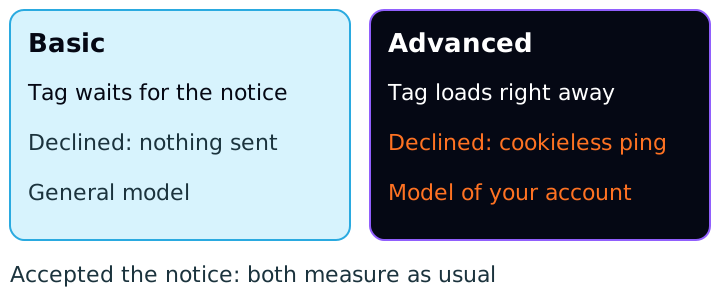
The difference between the two modes, according to Google's documentation:
- Basic: Google tags are held back until the person interacts with the banner. Nothing is sent before that and, if they decline, the tags do not fire at all. Google Ads conversion modeling then relies on a general model.
- Advanced: tags load when the person arrives, with consent set to
deniedby default unless you configure something else. With consent denied, tags still send measurements without cookies. According to the page, this enables an advertiser-specific model, more detailed than the general model used in basic mode.
Advanced mode gives Google more signal to estimate from, but it also sends something to Google before the person has chosen. Which mode to adopt involves both marketing and legal; it is not just a technical setting.
When modeling kicks in (and when it does not)
Two different features are often treated as one.
Google Ads: conversion modeling. According to the Help page, it applies to those who meet all the requirements, and two are listed: having correctly implemented Consent Mode (or the IAB TCF v2.0) and having at least 700 ad clicks over 7 days, per country and domain grouping. Once the criteria are met, models go through training periods and modeled conversions gradually appear in the "Conversions" column. All reports that use conversion columns are affected by them. If you track value, modeled value appears in the "Conversion value" column.
GA4: behavioral modeling. Analytics Help lists these requirements: Consent Mode enabled across all pages and screens, the advanced implementation on the web (Google tags load in all cases), at least 1,000 events per day with analytics_storage denied for at least 7 days, and at least 1,000 daily users with analytics_storage granted, active on at least 7 of the previous 28 days. The page warns that training can take more than 7 days and that meeting the requirements does not guarantee eligibility. To see modeled data, the property's reporting identity must be set to "Blended"; other options hide it.
What this means for a small account: a site with few clicks per day may simply not reach the thresholds. In that case, people who decline cookies leave a hole in the data, and the estimate does not fill it.
How much it weighs: a hypothetical example
The numbers below are made up to show the math, and they simplify on purpose. Imagine a store that spends R$ 25,000 in a month and actually generated 250 conversions, which is R$ 100.00 per conversion (25,000 ÷ 250). Assume people who accept cookies convert at the same rate as those who decline (in real life that is almost never exact) and that no modeling has kicked in yet.
80%
- Conversions seen
- 200
- Apparent cost per conversion
- R$ 125.00
60%
- Conversions seen
- 150
- Apparent cost per conversion
- R$ 166.67
40%
- Conversions seen
- 100
- Apparent cost per conversion
- R$ 250.00
| Acceptance rate (hypothetical) | Conversions seen | Apparent cost per conversion |
|---|---|---|
| 80% | 200 | R$ 125.00 |
| 60% | 150 | R$ 166.67 |
| 40% | 100 | R$ 250.00 |
At 60% acceptance, the report shows 150 of 250 conversions, and the apparent cost per conversion rises from R$ 100.00 to R$ 166.67 (25,000 ÷ 150) without the campaign getting worse. If the account is eligible, modeling estimates part of the 100 missing conversions. The documentation does not promise to recover all of them, and Google does not publish a typical percentage, so do not treat the modeled number as a guarantee.
Where LGPD comes in
Consent Mode is a Google tool. LGPD (Law 13,709/2018) is the Brazilian law, and it does not say how to configure tags. What it does say, and what matters here:
- Consent is defined as a "free, informed and unambiguous expression by which the data subject agrees to the processing of their personal data for a specific purpose" (art. 5, XII; translated from the Portuguese original).
- Consent is one of the grounds that allow processing of personal data, alongside others listed in art. 7. Which ground applies to each type of cookie or data is a legal analysis, and this text does not make it.
- When consent is the basis, the controller has the burden of proving it was obtained in line with the law (art. 8, § 2), it must refer to specific purposes, and generic authorizations are void (art. 8, § 4).
- Consent can be revoked at any time, through a free and easy procedure (art. 8, § 5).
Google's user consent policy, for its part, applies to users in the European Economic Area, the United Kingdom and Switzerland. It asks for consent "where legally required", records of consent and clear instructions for revoking it. The page does not mention Brazil. So what leads a Brazilian site to ask for consent is LGPD and your legal team's guidance, and Consent Mode is the way to make Google tags respect that choice.
Because Google's documentation also says each region has its own privacy laws, it recommends setting the denied default only for the appropriate regions, as long as the consent mechanism lets visitors in those regions update their choice.
How to explain the drop to a client
The conversation gets easier with three sentences, all verifiable:
- 1."People who decline cookies stop showing up as measured conversions. The sale happened; the report just cannot see it."
- 2."Google estimates part of this when the account has enough volume. For your account, the condition is this: ..." and then you cite the click or event requirement above.
- 3."That is why we compare e-commerce or CRM revenue with platform conversions, not platform conversions alone."
The third sentence is the most useful. A sale recorded in your own system (store, CRM) does not depend on the cookie, and works as a cross-check for any drop in measured conversions.
How to apply
- 1.Ask the client which CMP is in use and confirm it sends all four signals to Google (
ad_storage,analytics_storage,ad_user_data,ad_personalization). - 2.Decide with legal the mode (basic or advanced) and the default state by region.
- 3.Confirm that
defaultruns before any measurement tag and thatupdateis called when the person chooses. - 4.In GA4, under Admin, Data display, Reporting identity, choose "Blended" to see modeled data, if the property is eligible.
- 5.Note the date the banner went live (or the mode changed) in your reports, to separate a measurement effect from a campaign effect.
- 6.For 4 weeks, track the ratio between the client's system sales and platform conversions. It shows the size of the hole.
Relator Digital connects Meta Ads, Google Ads and GA4 in one workspace. That helps with step 6, because it brings the numbers from those platforms together in one place, but setting up consent is still done on the client's site.
Sources
All checked on October 17, 2026. Left out, for lack of an official source checked today: the ANPD cookie guide, any claim that Consent Mode is mandatory in Brazil, and which legal basis applies to each cookie.
- Google for Developers, Consent mode overview: the four signals, basic and advanced modes.
- Google for Developers, Consent Mode: implementation guide:
default,updateand the two new parameters. - Google Ads Help, About consent mode modeling: requirements and modeled conversions.
- Google Analytics Help, Consent Mode (Google Analytics Help): behavior by mode and regions.
- Google Analytics Help, Behavioral modeling: requirements and reporting identity.
- Google, EU user consent policy: regions, records and revocation.
- Câmara dos Deputados, Law No. 13,709/2018 (LGPD), updated text, in Portuguese: arts. 5, 7 and 8.
This article is also available as Markdown, for agents and LLMs: view .md version