How to send CRM sales back to your ad platforms
A lead becomes a sale in the CRM, but Meta and Google only know the form. See what to store at click time, what to send back and today's deadlines.
Contents
Meta and Google Ads only optimize for what they get to know. If the sale happens in the CRM weeks after the form, the platforms keep seeing only the lead, including the ones that never bought. The fix is to store the click identifier with the lead and, when the deal is won, send that event back: in Google Ads as an offline conversion import, on Meta as a Conversions API event. This only works if the data is stored on the day of the click and sent within each platform's deadline.
Why cost per lead misleads without the sale
Cost per lead measures the form, not the outcome. Two campaigns with the same spend can bring the same number of contacts and very different sales.
Here is a hypothetical example. An agency spends R$ 10,000 on each of two campaigns for the same clinic. Average ticket of R$ 3,000, reported by the CRM.
Spend
- Campaign A
- R$ 10,000
- Campaign B
- R$ 10,000
Leads
- Campaign A
- 120
- Campaign B
- 80
Sales in the CRM
- Campaign A
- 2
- Campaign B
- 8
Cost per lead
- Campaign A
- R$ 83.33
- Campaign B
- R$ 125.00
Cost per sale
- Campaign A
- R$ 5,000
- Campaign B
- R$ 1,250
Revenue (sales × R$ 3,000)
- Campaign A
- R$ 6,000
- Campaign B
- R$ 24,000
ROAS
- Campaign A
- 0.6
- Campaign B
- 2.4
| Item | Campaign A | Campaign B |
|---|---|---|
| Spend | R$ 10,000 | R$ 10,000 |
| Leads | 120 | 80 |
| Sales in the CRM | 2 | 8 |
| Cost per lead | R$ 83.33 | R$ 125.00 |
| Cost per sale | R$ 5,000 | R$ 1,250 |
| Revenue (sales × R$ 3,000) | R$ 6,000 | R$ 24,000 |
| ROAS | 0.6 | 2.4 |
The math: 10,000 ÷ 120 = 83.33; 10,000 ÷ 80 = 125; 10,000 ÷ 2 = 5,000; 10,000 ÷ 8 = 1,250; 2 × 3,000 = 6,000 and 6,000 ÷ 10,000 = 0.6; 8 × 3,000 = 24,000 and 24,000 ÷ 10,000 = 2.4. If the platform only sees leads, campaign A looks best, and the algorithm tends to look for more people like it.
The link that cannot break: the click ID
To connect a sale to an ad, someone must have stored the click. There are four steps, and if one fails, the next ones have no data.
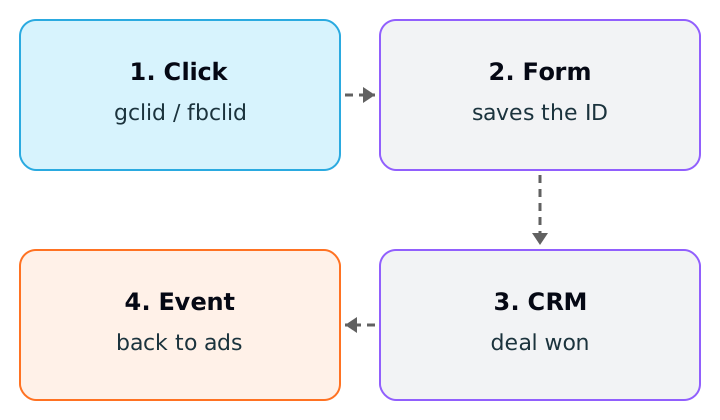
- 1.The click carries an ID. On Google, the
gclidis appended to the URL when auto-tagging is on. On Meta, thefbclidcomes as a parameter of the destination URL. - 2.The site captures the ID. A script reads the parameter and stores it, for example, in a hidden form field.
- 3.The CRM keeps the ID on the lead. If the form does not write the field, the ID is lost at the first step.
- 4.The sale becomes an event. When the deal is won, the ID and the time of the sale go to the platform.
The Google Ads page that describes the setup lists the conditions: auto-tagging turned on, being able to change your pages' code to capture the gclid, and being able to store it with the contact's data. It also warns that the gclid is case sensitive, so upload exactly the value you captured. The page also notes that storing the ID should respect local cookie-consent rules.
Google Ads: import the sale by click
Google's help page lists three ways to import offline conversions: enhanced conversions for leads (the option Google recommends), conversions from clicks using the gclid, and conversions from calls.
What the documentation says about each limit:
- With a
gclid, Google accepts the conversion as long as it is no more than 90 days old, and keeps thegclidfor only 90 days. - With hashed contact data, the limit drops to 63 days.
- For scheduled uploads, Google recommends waiting 6 hours for the click to be processed. If it has not been, upload again after 12 hours.
- A conversion cannot happen before the click.
- If you send the same
gclid, the same conversion name and the same time twice, the second is treated as a duplicate and is not reported. For two distinct conversions on the same click, use different times.
When reading the result, Google advises using the "All conv. (by conv. time)" column, which reports by the day of the conversion, and checking the upload's results file, because some conversions may be rejected.
Meta: a server event with the click and the contact
Meta calls the old Offline Conversions API legacy and points to the Conversions API as the recommended method for offline events. In practice, the CRM sale becomes a server event. The points from the documentation:
- Customer data. You must send at least one
user_dataparameter in the correct format. Email (em) and phone (ph) go SHA-256 hashed, after normalizing: email trimmed and lowercase, phone with digits only and with the country code. Thefbcis not hashed. - The
fbc. It follows the formatfb.${subdomain_index}.${creation_time}.${fbclid}and can be built from thefbclidstored in the CRM. - Meta form leads. The
lead_id(a number, not hashed) identifies a lead generated on Lead Ads. action_source. Says where the conversion happened. Accepted values includewebsite,physical_store,phone_call,chat,email,system_generated,business_messagingandother.event_time. Can be up to 7 days before sending, and if one event in a batch is older, the entire request returns an error.event_id. Optional but recommended: it deduplicates events that arrive from the pixel and from the API, with the sameevent_name. The order number usually works.
The documentation also recommends sending the same customer parameters in the browser and on the server, and including the country even when all leads are from Brazil.
The sale that arrives too late
The deadline is where most uploads get lost. Hypothetical example: someone clicks a school's ad on January 5, becomes a lead the same day and closes the enrollment on April 10. Between the click and the sale, 95 days passed (26 in January, 28 in February, 31 in March and 10 in April: 26 + 28 + 31 + 10 = 95). This upload exceeds Google's 90-day limit and is rejected.
10 days
- Google (
gclid) - Accepts
- Google (hashed contact)
- Accepts
- Meta (general rule)
- Send within 7 days
- Google (
70 days
- Google (
gclid) - Accepts
- Google (hashed contact)
- Rejects (limit of 63)
- Meta (general rule)
- Send within 7 days
- Google (
95 days
- Google (
gclid) - Rejects (limit of 90)
- Google (hashed contact)
- Rejects
- Meta (general rule)
- Send within 7 days
- Google (
| Sales cycle | Google (gclid) | Google (hashed contact) | Meta (general rule) |
|---|---|---|---|
| 10 days | Accepts | Accepts | Send within 7 days |
| 70 days | Accepts | Rejects (limit of 63) | Send within 7 days |
| 95 days | Rejects (limit of 90) | Rejects | Send within 7 days |
The Meta column is about the time between the event and the upload, not between the click and the sale. That is why the habit that works is to send when the status changes, not once a month. When the cycle is longer than the limit, the alternative is to send an intermediate stage, such as "meeting held" or "proposal sent", which happens within the deadline. The downside is that the intermediate event is not revenue; treat it as a quality signal and keep real revenue in the CRM report.
When there is no click ID
The click was not always stored: old forms, phone calls, WhatsApp. Google recommends enhanced conversions for leads, which add hashed contact data to the upload, and Meta accepts hashed em and ph. In neither case should you treat the return as guaranteed: the pages consulted give no match rate, so this text does not promise one either.
What this changes in the report
Sending improves what the platform optimizes, but the report must show what the CRM says anyway. Relator reads won deals in HubSpot or RD Station CRM, matches them with the lead's campaign and calculates real ROAS on the report side. Keep the two things separate: the report shows the CRM's revenue, and the upload teaches the algorithm.
How to apply
- 1.Confirm that auto-tagging is on in the Google Ads account.
- 2.Add hidden fields to the form for
gclidandfbclid(and forutm_*), and confirm each one reaches the CRM on the lead. - 3.Test: click one of your ads, fill in the form and check the value in the CRM record.
- 4.Define with the client which CRM stage counts as a sale and which field holds the value.
- 5.Choose the upload timing: as soon as the status changes. Note the average sales cycle and compare it with 90 and 63 days (Google) and with 7 days (Meta).
- 6.In Google Ads, create the import conversion action and watch the results file of the first uploads.
- 7.On Meta, send through the Conversions API with the right
action_source, a stableevent_idand normalized, hashed customer data. - 8.If the cycle exceeds the limit, choose an intermediate stage and keep real revenue in the CRM report.
Sources
All checked on October 19, 2026. Left out is what the pages read do not say: the exact column format and time zone of Google's upload file, exceptions to Meta's event_time deadline for offline events, the expected match rate and consent requirements (LGPD) for this kind of upload.
- Google Ads Help, Set up offline conversions using Google click ID (GCLID): auto-tagging requirements,
gclidcapture and storage, case sensitivity. - Google Ads Help, Offline conversion imports FAQs: 90 and 63-day limits, click processing time, duplicates, conversion-time column.
- Google Ads Help, About offline conversion imports: import methods and the move to the Data Manager API.
- Meta for Developers, Conversions API: offline events: Offline Conversions API as legacy and Conversions API as the recommended method.
- Meta for Developers, Customer information parameters:
fbc, hashing ofemandph,lead_id. - Meta for Developers, Server event parameters:
event_time,action_source,event_id.
This article is also available as Markdown, for agents and LLMs: view .md version