Time zone and currency: the silent error that misaligns reports
Each account closes the day in its own time zone and keeps one currency. See what the platforms let you change and how to align everything before month-end.
Contents
The numbers from Meta, Google Ads and GA4 often differ because each account closes the day in its own time zone and keeps values in its own currency. None of this shows up as an error: the report opens, the totals look reasonable and only the month-end close fails to match. The way out is to check the time zone and currency of each account once, write down what you found and pick a conversion rule before comparing sources.
Why each platform's day ends at a different time
Every daily report needs a rule that says where one day ends and the next begins. That rule is the time zone of the account or property.
Google Ads says that reports segmented by time produce results "according to your account time zone". So a click at 11:50 p.m. in one zone and at 3:50 a.m. the next day in another is the same click, but it goes into different rows of the table.
The problem shows up when you put side by side sources with different time zones: the store dashboard, GA4, the ads manager and the CRM. Each one counts the same event, just on its own calendar.
One order, two calendars
Here is a hypothetical example. A store in São Paulo receives an order at 2:00 a.m. on February 1, Brasília time (UTC−3). The GA4 property uses the São Paulo time zone, so the order belongs to February 1. The ad account, however, was created on Pacific time, standard time (UTC−8, the January offset), which is five hours behind Brasília. For it, the same order happened at 9:00 p.m. on January 31.
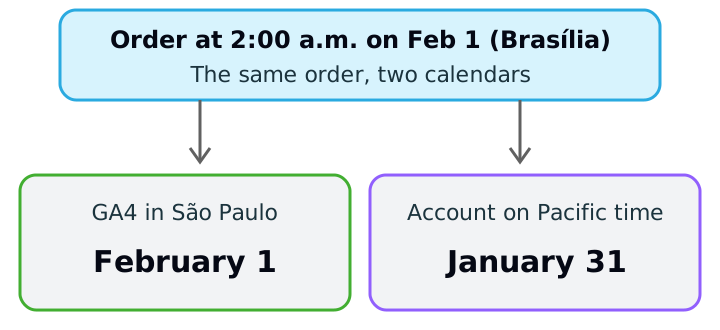
If that order is the first of February, the ad account counts it in January while GA4 counts it in February. Over a whole month, the effect looks like this, still in the hypothetical example:
Total January orders
- GA4 (São Paulo)
- 1,200
- Account (Pacific)
- 1,200
Orders from the start of January 1 (12:00 a.m. to 4:59 a.m., Brasília) that the account moves to December
- GA4 (São Paulo)
- 0
- Account (Pacific)
- −6
Orders from the start of February 1 (12:00 a.m. to 4:59 a.m., Brasília) that the account moves to January
- GA4 (São Paulo)
- 0
- Account (Pacific)
- +4
January orders in the report
- GA4 (São Paulo)
- 1,200
- Account (Pacific)
- 1,198
| Item | GA4 (São Paulo) | Account (Pacific) |
|---|---|---|
| Total January orders | 1,200 | 1,200 |
| Orders from the start of January 1 (12:00 a.m. to 4:59 a.m., Brasília) that the account moves to December | 0 | −6 |
| Orders from the start of February 1 (12:00 a.m. to 4:59 a.m., Brasília) that the account moves to January | 0 | +4 |
| January orders in the report | 1,200 | 1,198 |
The math: 1,200 − 6 + 4 = 1,198. A two-order gap is small, but with a high ticket value, or with daily closes to pay commission, it becomes an argument. And it gets worse when someone reconciles only the monthly total and concludes that "two orders are missing".
What you can (and cannot) change on each platform
What matters here is knowing which fix exists. Checked today on the official pages:
Google Ads. The help page states that the time zone is "permanently set" when you create the account and that the setting cannot be updated because it is "a fundamental part" of reporting and billing. The currency is also permanent, since it determines how you are billed. To work in another time zone, the path described is to create a new account. The same page covers an exception for manager accounts (MCC), where Google can reset the time zone only once and only eastward.
Meta. The ads manager page on time zones says that changing the time zone closes your current ad account and creates a new one, that the old account cannot be reactivated, and that the default for new accounts is Pacific Standard Time (PST). So the advice is to check the time zone before creating campaigns. For currency, Meta allows a change once every 60 days, with no outstanding balance, and does not allow it on an account paid by monthly invoicing once the account has been created. Choosing a new currency and time zone also creates a new account.
GA4. When you create the property you choose the report time zone and currency. If you pick a time zone that observes daylight saving time, Analytics adjusts for the changes automatically; to avoid that, use Greenwich Mean Time. Changing the time zone of an existing property affects only later data and may create "a flat spot or a spike" in your data. Google recommends changing the time zone no more than once per day so Analytics can process the change.
One thing the documentation I consulted does not say, and which is therefore left out: what happens to GA4's historical values when the property currency is changed. If you need to change it, test first on a support property and document the date.
Currency: the exchange rate that moves your ROAS
The currency of an ad account is hard to change: on Google Ads it is permanent and on Meta the change creates another account. If the account bills in dollars and the sale is in reais, someone converts, and the chosen rate enters the result.
Hypothetical example: an account spends US$ 10,000 in the month and the revenue reported by the store is R$ 150,000. ROAS (revenue divided by spend) depends on the rate used to convert the spend:
5.00
- Spend in reais
- R$ 50,000
- ROAS
- 3.00
5.25
- Spend in reais
- R$ 52,500
- ROAS
- 2.86
5.50
- Spend in reais
- R$ 55,000
- ROAS
- 2.73
| Rate used (R$ per US$) | Spend in reais | ROAS |
|---|---|---|
| 5.00 | R$ 50,000 | 3.00 |
| 5.25 | R$ 52,500 | 2.86 |
| 5.50 | R$ 55,000 | 2.73 |
The math: 10,000 × 5.00 = 50,000 and 150,000 ÷ 50,000 = 3.00; 10,000 × 5.25 = 52,500 and 150,000 ÷ 52,500 ≈ 2.86; 10,000 × 5.50 = 55,000 and 150,000 ÷ 55,000 ≈ 2.73. The rates are illustrative, not real quotes. The point is that the campaign is the same in all three rows, and ROAS drops from 3.00 to 2.73 just because of the rate.
Two practices avoid the fight:
- 1.One exchange rule per report. For example: convert each day at that day's rate, or convert the whole month at a fixed rate set at the start of the month. Either works; what does not work is each person using a different one.
- 2.Show the original currency alongside. The dollar amount does not change with the exchange rate and lets you check the number against the platform's invoice.
A ten-minute inventory per account
Aligning starts with knowing what exists. Build a simple table, one row per source:
Google Ads account
- Time zone
- (note it)
- Currency
- (note it)
- Can it change?
- No, only by creating another account
Meta account
- Time zone
- (note it)
- Currency
- (note it)
- Can it change?
- Only by creating another account
GA4 property
- Time zone
- (note it)
- Currency
- (note it)
- Can it change?
- Yes, with effect only from then on (time zone)
Store or CRM
- Time zone
- (note it)
- Currency
- (note it)
- Can it change?
- Depends on the system
| Source | Time zone | Currency | Can it change? |
|---|---|---|---|
| Google Ads account | (note it) | (note it) | No, only by creating another account |
| Meta account | (note it) | (note it) | Only by creating another account |
| GA4 property | (note it) | (note it) | Yes, with effect only from then on (time zone) |
| Store or CRM | (note it) | (note it) | Depends on the system |
Fill in "Time zone" and "Currency" by looking at each account's settings, not at the team's memory. This is usually when an old account created in the wrong time zone turns up.
How to apply
- 1.Open each account's settings and write the time zone and currency in the inventory.
- 2.Choose the reference time zone for the client's report (usually the business's own) and put it in the footer.
- 3.Choose the exchange rule and record it: per day or a fixed monthly rate, and the source of the rate.
- 4.When the gap between sources is small and concentrated around midnight, explain the cause before investigating tracking.
- 5.Monthly closes: compare monthly totals by platform knowing that the first and last days may move.
- 6.When opening a new ad account, set the right time zone and currency at creation. Fixing it later requires a new account.
- 7.If you change GA4's time zone, note the date as an annotation in the report and do not compare the days around it as if they were comparable.
Sources
All checked on October 18, 2026. Left out, for lack of an official source read in full: any rule on currency conversion in Google Ads manager accounts and the effect of changing a GA4 property's currency on old data. Meta's rules were checked against the titles and excerpts of the official pages; confirm the details in your account before acting.
- Google Ads Help, About your language, number format, time zone, and currency settings: permanent time zone and currency, reports in the account time zone.
- Meta Business Help Center, Change the time zone for your ad account: changing the time zone closes the account and creates another; default PST.
- Meta Business Help Center, Change the currency you use for Facebook ads: one change every 60 days and the monthly invoicing exception.
- Analytics Help, Add a Google Analytics 4 property: report time zone, daylight saving and effect only from then on.
This article is also available as Markdown, for agents and LLMs: view .md version