Metrics dictionary: build one with your client in a single meeting
A metrics dictionary ends the argument over which number is right. See the columns, a worked example and an agenda for a 60-minute meeting.


Contents
A metrics dictionary is a short table, agreed with the client, that says for each number in the report what it means, how it is calculated, where it comes from and who answers for it. You can build the first version in a one-hour meeting with four columns: name, formula, source and owner. The payoff comes later: nobody argues about which number is right, because the report and the client are talking about the same thing.
The same name can hide two numbers
The dictionary solves a simple problem: identical names, different calculations. Three examples from the official documentation.
Conversions in Google Ads. The "Conversions" column shows only the conversion actions you chose to include in it, and it is the column used by Smart Bidding. The "All conversions" column has everything in "Conversions" plus the actions you left out of it, as well as store visits and certain phone calls. View-through conversions appear in "All conversions" but not in "Conversions". If the client says "we had 120 conversions" and you are looking at the other column, you can both be right and still disagree.
Users in GA4. The documentation defines active users as the unique users who engaged with your site or app in the date range, and total users as the unique users who triggered any event in the range. Both are "users", but they are not the same number. The same page warns that factors such as thresholding (withholding data when few users would make someone identifiable) can cause differences between these numbers.
Conversion in GA4. The documentation now speaks of a key event: an event that measures an action particularly important to the success of your business, and any collected event can be marked as one. If the client still says "conversion" for GA4 and "conversion" for Google Ads, the dictionary has to say which of the two each row refers to.
Some definitions are not obvious from the name either. A GA4 engaged session, for example, is one that lasts about 10 seconds or more, has a key event, or has two or more page or screen views. Engagement rate is the percentage of engaged sessions, and bounce rate is the percentage of sessions that were not engaged. Someone who reads "bounce rate" without knowing this may be interpreting something else.
The four columns that are enough
For each metric, the table answers four questions.
- 1.Name: what the metric is called in the report and in conversation with the client. One name, the same everywhere.
- 2.Formula: the calculation, with numerator and denominator when it is a ratio. "CPL = spend ÷ leads" says more than "cost per lead".
- 3.Source: where the number comes from, naming the system and, when there is one, the column or field. "Google Ads, Conversions column" and "CRM, deals in the Qualified stage" are sources; "the platform" is not.
- 4.Owner: the person or team that answers for the number. If it looks wrong, that is who you ask; if the definition changes, that is who gives notice.
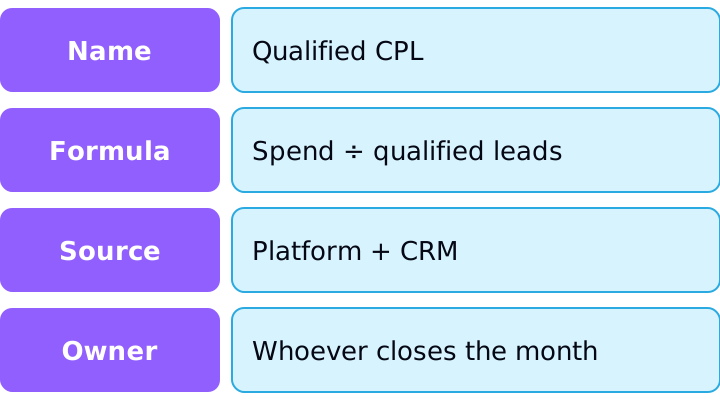
Two extra columns help when a metric is sensitive: period (for example, "closed month" or "rolling last 30 days") and breakdown (by account, campaign or channel). They prevent the mistake of comparing a closed month with a rolling window.
A worked example with the math checked
The numbers below are hypothetical, to show how to fill in the table. An account spent R$ 12,000 on media in the month and generated 300 leads. The sales team classified 90 of them as qualified and closed 9 sales, worth R$ 45,000 in total.
Leads
- Formula
- Form submissions
- Source
- Ad platform
- Owner
- Media
- Value
- 300
CPL
- Formula
- Spend ÷ leads
- Source
- Media
- Owner
- Media
- Value
- 12,000 ÷ 300 = R$ 40.00
Qualified lead
- Formula
- Lead accepted by sales
- Source
- CRM
- Owner
- Sales
- Value
- 90
Qualified CPL
- Formula
- Spend ÷ qualified leads
- Source
- Media + CRM
- Owner
- Media
- Value
- 12,000 ÷ 90 = R$ 133.33
Lead-to-sale rate
- Formula
- Sales ÷ leads
- Source
- CRM
- Owner
- Sales
- Value
- 9 ÷ 300 = 3.0%
ROAS
- Formula
- Revenue from sales ÷ spend
- Source
- CRM + media
- Owner
- Media
- Value
- 45,000 ÷ 12,000 = 3.75
| Name | Formula | Source | Owner | Value |
|---|---|---|---|---|
| Leads | Form submissions | Ad platform | Media | 300 |
| CPL | Spend ÷ leads | Media | Media | 12,000 ÷ 300 = R$ 40.00 |
| Qualified lead | Lead accepted by sales | CRM | Sales | 90 |
| Qualified CPL | Spend ÷ qualified leads | Media + CRM | Media | 12,000 ÷ 90 = R$ 133.33 |
| Lead-to-sale rate | Sales ÷ leads | CRM | Sales | 9 ÷ 300 = 3.0% |
| ROAS | Revenue from sales ÷ spend | CRM + media | Media | 45,000 ÷ 12,000 = 3.75 |
Notice that three rows depend on the CRM. If "qualified lead" is not written down, a CPL of R$ 40 looks great and one of R$ 133.33 looks alarming, and both describe the same month. The dictionary does not decide which is better; it stops anyone from comparing one with the other without knowing it.
Also note that the table contains ratios (CPL, rate, ROAS). Recording the numerator and denominator in the formula is what lets you consolidate several months or accounts correctly: sum the components and divide at the end, rather than averaging the ratios. The article on metrics that don't add up explains this rule with examples (in Portuguese).
The 60-minute meeting
Bring the table with half the rows already filled in from the current reports, and use the meeting to confirm, correct and settle owners. One possible agenda:
- 1.0 to 10 min, business goal. Ask what the client decides with the numbers: raise budget, cut a campaign, change an offer. Only metrics tied to one of those decisions go in the dictionary.
- 2.10 to 25 min, choosing metrics. Get to 8 to 12. If there are more, ask which decision each extra one supports; those with no answer stay out.
- 3.25 to 45 min, name, formula and source. Go through the list line by line. For ambiguous names (conversion, lead, sale, user), force a choice and write the definition in the client's own words.
- 4.45 to 55 min, owners. Every row leaves with a responsible person. A metric with no owner tends to drift wrong without anyone noticing.
- 5.55 to 60 min, next steps. Decide who publishes the dictionary, where it lives and when it will be reviewed.
Two precautions avoid rework. First, write the definition in the client's language, not the platform's, and note the technical name of the source column beside it. Second, record the configuration decisions that change the number: which conversion action goes into the main column, and in which time zone and currency the account runs. The last two are a frequent source of differences; the article on time zone and currency of ad accounts shows how they misalign reports (in Portuguese).
Where the dictionary lives and when it changes
A dictionary only works if it is within reach of whoever reads the report. Keep it as the last page of the monthly report or in a document shared with the client, with the date of the last review at the top.
Three triggers call for a review:
- A platform changed a definition or a name. Check the official documentation from time to time and record the equivalence between the old term and the new one.
- The client's goal changed. Going from generating leads to selling directly, for example, changes which metrics matter.
- Someone complained about a number. Every "this number looks odd" is a missing or outdated entry.
When you change a definition, note the date and do not rewrite the past without telling anyone. Comparing a month calculated one way with a month calculated another way is the same mistake as comparing different attribution windows.
How to apply
- 1.List the decisions the client makes with the report and the metrics that support each one.
- 2.Cut the list down to 8 to 12 metrics.
- 3.For each, fill in name, formula (with numerator and denominator), source and owner. Add period and breakdown where there is a risk of confusion.
- 4.Flag the ambiguous ones (conversion, lead, sale, user) and ask the client for the definition in their own words.
- 5.Check each formula against a real month: redo the math by hand from the components and see whether it matches the report.
- 6.Publish the dictionary with the report, with the review date.
- 7.Review it every quarter and whenever the platform or the goal changes.
Sources
Checked on October 25, 2026. Meta's click definitions (all clicks, link clicks, outbound clicks) were left out because the official pages could not be read today; the dictionary example does not depend on them.
- Google Ads: About "All conversions": difference between "Conversions" and "All conversions", use in Smart Bidding and view-through conversions.
- Google Analytics: dimensions and metrics: active users, total users and thresholding.
- Google Analytics: engaged session, engagement rate and bounce rate: definitions of the three metrics.
- Google Analytics: key events: definition of a key event and how to mark an event.
- Google Analytics: about data thresholds: thresholds exist to prevent inferring the identity of users.
About the author
João Vitor Moitinho
João Vitor Moitinho is the founder of Relator Digital. A computer engineer, he works on growth, measurement and martech, and writes here about what he learns building reports for performance agencies.
João Vitor Moitinho on LinkedInThis article is also available as Markdown, for agents and LLMs: view .md version