Server-side tagging: when it pays off and when it's hype
Server-side tagging has a fixed cost and does not replace consent. See what the official docs promise, what it costs, the alternatives and how to decide.


Contents
Server-side tagging makes sense when you already measure well in the browser and need something only a server delivers: less code on the site, cookies written by your own server and more control over what goes to each platform. It does not make sense as a "fix" for poorly planned tracking, and it has a fixed monthly cost. The decision is about economics and maintenance, not fashion.
What server-side tagging is, in one sentence
It is a server of yours between the visitor's browser and the ad and analytics platforms. The page sends events to that server, and it forwards them to Google, Meta and anyone else you configure.
Google's official page defines it as a way to instrument your tags to measure user activity wherever it happens. Server containers use the same tag, trigger and variable model you already know from Google Tag Manager.
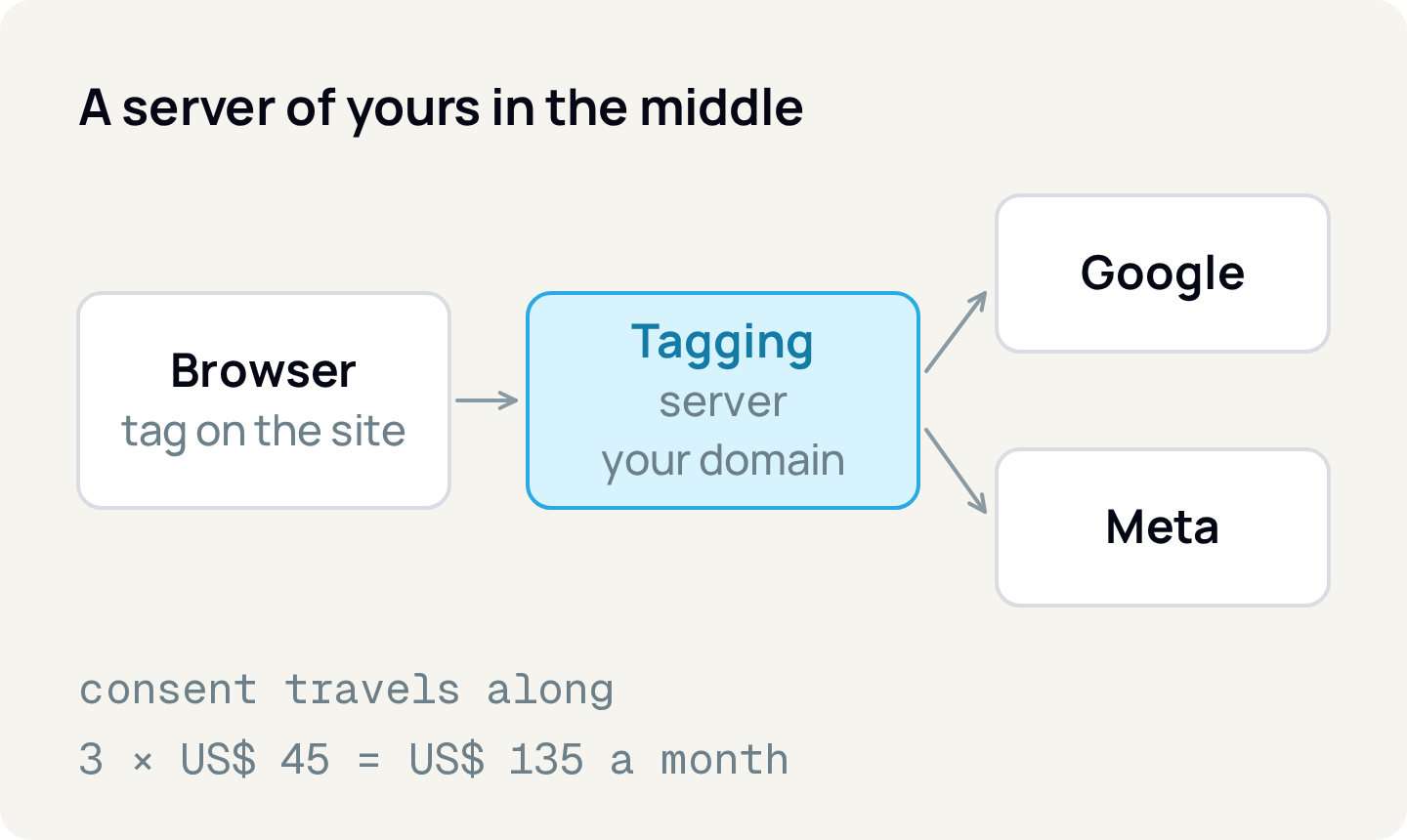
One point that is often misunderstood: the browser does not leave the picture. Google's documentation recommends using the Google Analytics tag on the page to send data to the server container, and Meta says server-side GTM needs a browser tag to emit the events. The server adds to the browser; it does not replace it.
What the official documentation promises (and what it doesn't)
Google's overview page names two concrete benefits:
- Performance. Fewer measurement tags on the site means less code to run on the client side.
- Security. Visitor data is better protected and more secure when collected and distributed in a customer-managed server-side environment.
It also covers cookies: if you point a subdomain of your site to the tagging server, the server can read and write cookies that page scripts cannot see (HttpOnly). The stated goal is to improve cookie privacy and durability.
What the documentation does not offer: no percentage of recovered conversions, no promise about ad blockers, no estimate of ROAS improvement. If someone sells you server-side tagging with a number like that, ask for the source. In this article, any measurement gain stays a hypothesis to test in your own account.
What it costs
The server runs in a cloud, and you pay for it. Google's official figures vary by page:
Overview
- Cost per server
- US$30 to US$50 per month
- Recommended minimum
- 3 instances per container
Cloud Run setup guide
- Cost per server
- about US$45 per month (1 vCPU, 0.5 GB)
- Recommended minimum
- 2 instances
Infrastructure planning
- Cost per server
- about US$50 per instance per month
- Recommended minimum
- enough instances for normal traffic swings
| Source (Google) | Cost per server | Recommended minimum |
|---|---|---|
| Overview | US$30 to US$50 per month | 3 instances per container |
| Cloud Run setup guide | about US$45 per month (1 vCPU, 0.5 GB) | 2 instances |
| Infrastructure planning | about US$50 per instance per month | enough instances for normal traffic swings |
The same documentation notes costs beyond the instances: network egress can matter, and above the free logging quota, storing logs can get expensive. The Cloud Run guide flags volumes above about 1 million requests per month as a logging concern. It also recommends setting up a billing alert and says the maximum-instances setting is the worst-case spend.
The break-even math
A hypothetical example, only to show the math. Suppose 3 instances at US$45 each: 3 × 45 = US$135 per month, or US$1,620 per year. If each sale leaves US$20 of contribution margin, the server pays for itself when it helps record or optimize at least 135 ÷ 20 = 6.75 sales per month, that is, 7 sales.
Notice what the math shows: for a store selling hundreds of orders a month, 7 sales is small. For a client with 15 sales a month, 7 sales are almost half the total, and the math hardly works. This calculation does not include the time of whoever sets up and maintains the server, which is often the largest real cost.
Consent still applies
Moving the tag to the server does not remove the need for consent. Google's documentation says Google tags on the server are consent-aware and adjust the amount and kind of data they send according to the visitor's preferences. In basic mode, no Analytics cookies are set, accessed or read from the device, on either the client or the server.
The mechanism: the Google tag sends the user's preferences to the server container as parameters in the HTTP request. That is why consent mode only needs to be set up in the web container. For Google Ads, the documentation requires installing the Conversion Linker tag in the server container as well.
If you have not set up consent mode yet, start there: a server does not fix a badly implemented consent. See how it affects your numbers in Consent Mode v2 and LGPD.
Cheaper alternatives
Before building infrastructure, ask whether your goal is just to send conversion events to Meta more robustly. There are smaller paths:
- Meta's Conversions API Gateway. A self-serve option in Events Manager that sends events through the Pixel and the Conversions API without custom code. It runs on a server provisioned in your own cloud account (AWS or GCP, per the page) and, in Meta's words, its only cost is the cloud or partner fees.
- Meta's tag in server-side GTM. If you already have the server container, Meta maintains a Conversions API tag template. It requires the Pixel ID and an access token.
- Stay browser-only. If the Pixel and the Google tag already measure well and volume is low, the fixed cost may not be justified.
Whichever path you pick, deduplication stays critical: Meta asks for the same event_name in the browser and on the server, and for sending event_id (or external_id with fbp). We cover this in Meta's Conversions API explained for non-developers.
When it's hype
Signs you are adopting it out of fashion:
- The motivation is "everyone is using it," with no metric you want to improve.
- Browser tracking still has basic problems: inconsistent UTMs, duplicated events, poorly defined conversions. A server passes the error along; it does not fix it. Start with UTMs without the mess.
- Nobody on the team will monitor the server. A server that is down means lost events.
- Conversion volume is too small for the fixed cost, as in the math above.
When it pays off
- You have many tags on the site and page performance suffers.
- You need to control which data goes to each platform, for example because of a client's privacy requirements.
- You want first-party cookies on a subdomain of yours, with the durability the documentation describes.
- Sales volume makes the monthly cost small next to the margin, and someone will maintain the infrastructure.
How to apply
- 1.Write the goal in one sentence and the metric it should improve (for example, "cut load time" or "send purchases to Meta with deduplication").
- 2.Measure the browser baseline: events per day, conversions per platform, the gap between them.
- 3.Do the break-even math with your margin and Google's documented cost (instances × cost per server).
- 4.Fix what is broken first: consent, UTMs and conversion definition.
- 5.If Meta is the only target, evaluate the Gateway before the server container.
- 6.If you go ahead with server-side GTM, use your own subdomain, turn on the billing alert and set the maximum instances.
- 7.Compare against the baseline for 30 days. If the gain does not show up, turn it off.
If your goal is to see Meta, Google Ads and GA4 side by side, Relator Digital connects these sources in one place, which helps compare the baseline before you change tracking.
Sources
- Google Tag Manager: server-side tagging overview
- Google: set up server-side tagging with Cloud Run
- Google: planning infrastructure requirements and costs
- Google: server-side tagging and consent mode
- Google: send data to a server container
- Meta: Conversions API with server-side Google Tag Manager
- Meta: Conversions API Gateway
Checked on October 24, 2026. Dollar amounts are those in Google's documentation on that date and may change; confirm in the Google Cloud pricing calculator.
About the author
João Vitor Moitinho
João Vitor Moitinho is the founder of Relator Digital. A computer engineer, he works on growth, measurement and martech, and writes here about what he learns building reports for performance agencies.
João Vitor Moitinho on LinkedInThis article is also available as Markdown, for agents and LLMs: view .md version