Who has access to your client's ad accounts? A governance guide for agencies
The client owns the accounts; the agency joins as a partner with minimum access. How to grant, audit and remove access and tokens in Meta and Google.

Contents
The list of who should have access to your client's ad accounts, GA4 and Search Console is short: the client, as owner, and your agency as a partner, at the lowest level each person and each tool needs to do the job. No shared passwords, no personal account belonging to someone who already left. If you can't list today who has access to each account, that is where governance starts.
The client owns; the agency is a guest
The rule that prevents almost every problem is simple: assets stay in the client's name. The ad account, the pixel, the page, the GA4 property and the domain in Search Console belong to the company that pays for the media and is responsible for the data. The agency works on those assets because the client shared access, not because it created them inside its own structure.
This protects both sides. The client is not held hostage by the agency to recover its own history, and the agency does not hold third-party assets. When the ad account is created in the agency's portfolio "to speed things up", the exit becomes a negotiation; when the client is the owner, the exit is just removing access.
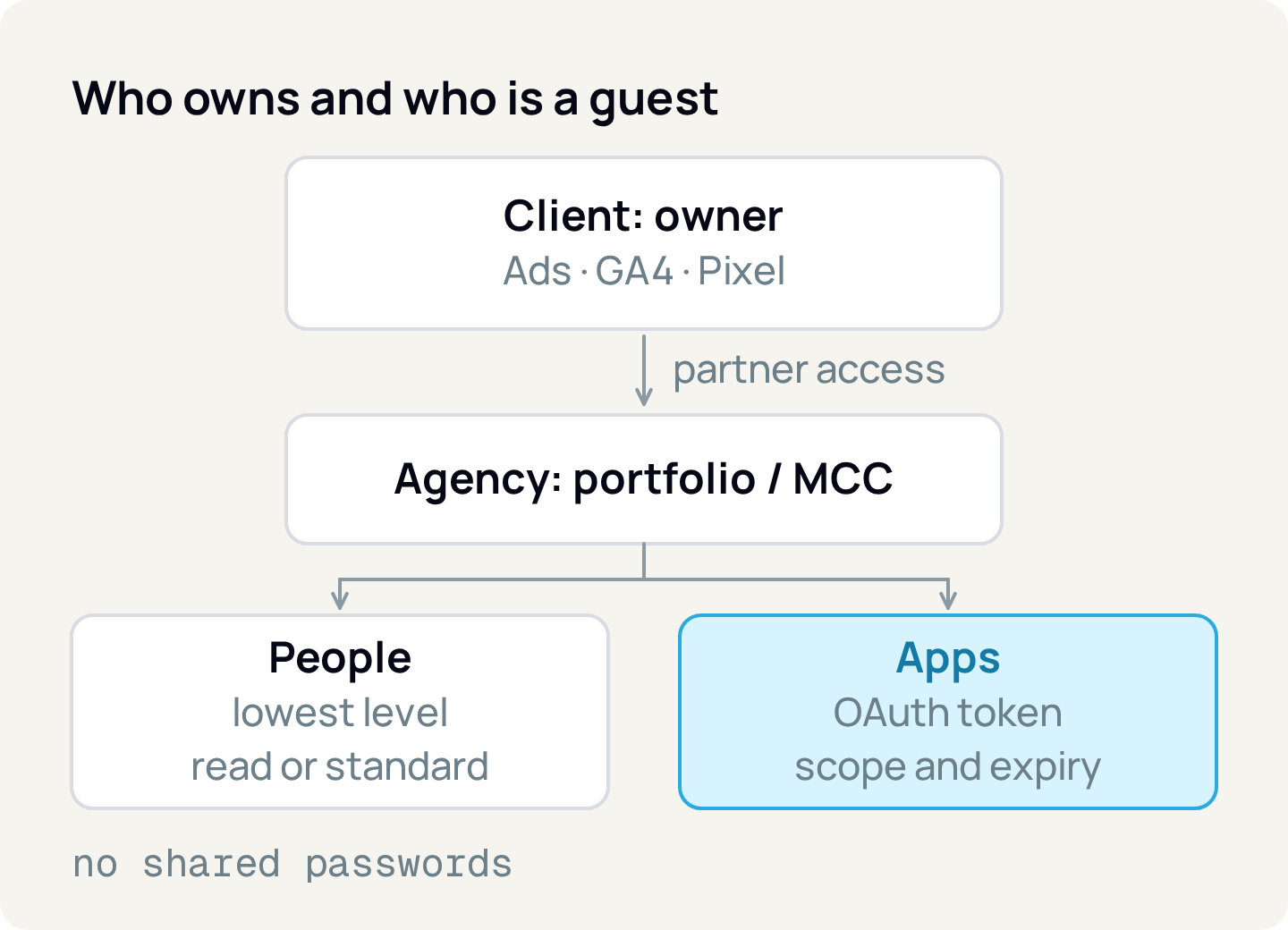
Below the client, the agency receives partner access and distributes it to people and apps. Apps are the forgotten layer: the reporting tool, the data connector, the bid automation. Each one comes in through a token, and a token is a key.
How to grant access on each platform without asking for a password
Every major platform has an official way to give an agency access without sharing a login.
Meta (Business Suite)
- Who owns it
- The client's business portfolio
- How the agency gets in
- The client shares assets with the agency's portfolio as a partner
- Available levels
- Full control or partial access, per asset and task
Google Ads
- Who owns it
- The client's account, with client admins
- How the agency gets in
- The agency's manager account (MCC) sends a link request and a client admin accepts
- Available levels
- Admin, Standard, Read only, Billing, Email only
GA4
- Who owns it
- The client's account and property
- How the agency gets in
- User or group added at the account or property
- Available levels
- Administrator, Editor, Marketer, Analyst, Viewer
Search Console
- Who owns it
- The client's verified owner
- How the agency gets in
- User added by the owner
- Available levels
- Owner, Full user, Restricted user
| Platform | Who owns it | How the agency gets in | Available levels |
|---|---|---|---|
| Meta (Business Suite) | The client's business portfolio | The client shares assets with the agency's portfolio as a partner | Full control or partial access, per asset and task |
| Google Ads | The client's account, with client admins | The agency's manager account (MCC) sends a link request and a client admin accepts | Admin, Standard, Read only, Billing, Email only |
| GA4 | The client's account and property | User or group added at the account or property | Administrator, Editor, Marketer, Analyst, Viewer |
| Search Console | The client's verified owner | User added by the owner | Owner, Full user, Restricted user |
In Meta, the client goes to the business portfolio settings, under Partners, and grants access to assets by entering the agency's business portfolio ID. The client chooses which assets to share (ad accounts, pages, datasets) and the access level. Then whoever manages the agency's portfolio assigns each asset to team members. The client can remove the partnership whenever they want.
In Google Ads, the agency sends the link request from the manager account using the customer ID, and an admin of the client account accepts it under Admin, Access and security. Google itself notes that anyone with admin access to the linked account can unlink it at any time.
In GA4, roles are cumulative. For reporting, Viewer is enough; Analyst lets the user share explorations. There are also data restrictions: "No Cost Metrics" and "No Revenue Metrics" hide those values from people who should not see them.
In Search Console, watch out for verified owners. Removing a person from the list does not delete their verification token (the HTML file, the meta tag or the DNS record); if it stays on the site, they can verify again and regain access.
Give the lowest level that gets the job done
Least privilege means starting at the lowest level and moving up only when the task requires it. An analyst who builds reports needs read-only in Google Ads and Viewer in GA4. A media buyer who launches campaigns needs Standard in Google Ads and partial access with ad tasks in Meta. Admin on the client's account stays with the client, and at most with one senior person at the agency when the contract says so.
Shared passwords and a personal "agency" login break all of this. You can't tell who made each change or remove one person's access without changing everyone's password, two-step verification becomes a code passed around on WhatsApp, and a former employee's personal account still belongs to them. If a login like that exists today, the first task is to replace it with individual users at the right level.
Tools are access too: what a token is
When you click "Sign in with Google" or "Continue with Facebook", the platform asks whether you authorize the app and, if you accept, hands it an OAuth token. The app never sees your password; it only receives the key.
Two things define what that key opens. The first is the scopes, the list of permissions shown on the consent screen. In Google, analytics.readonly only reads GA4 and webmasters.readonly only reads Search Console. In Meta, ads_read reads ads and ads_management can also change them. The second is who authorized it: the token acts with that person's permissions. If they had read-only access to one account, the app can only read; if they were admin on twenty accounts, the app reaches all twenty.
Not every platform offers a read-only scope. The Google Ads API has a single scope, adwords, which allows viewing, editing, creating and deleting. To limit a tool in Google Ads, the control is the access level of the person who authorizes it.
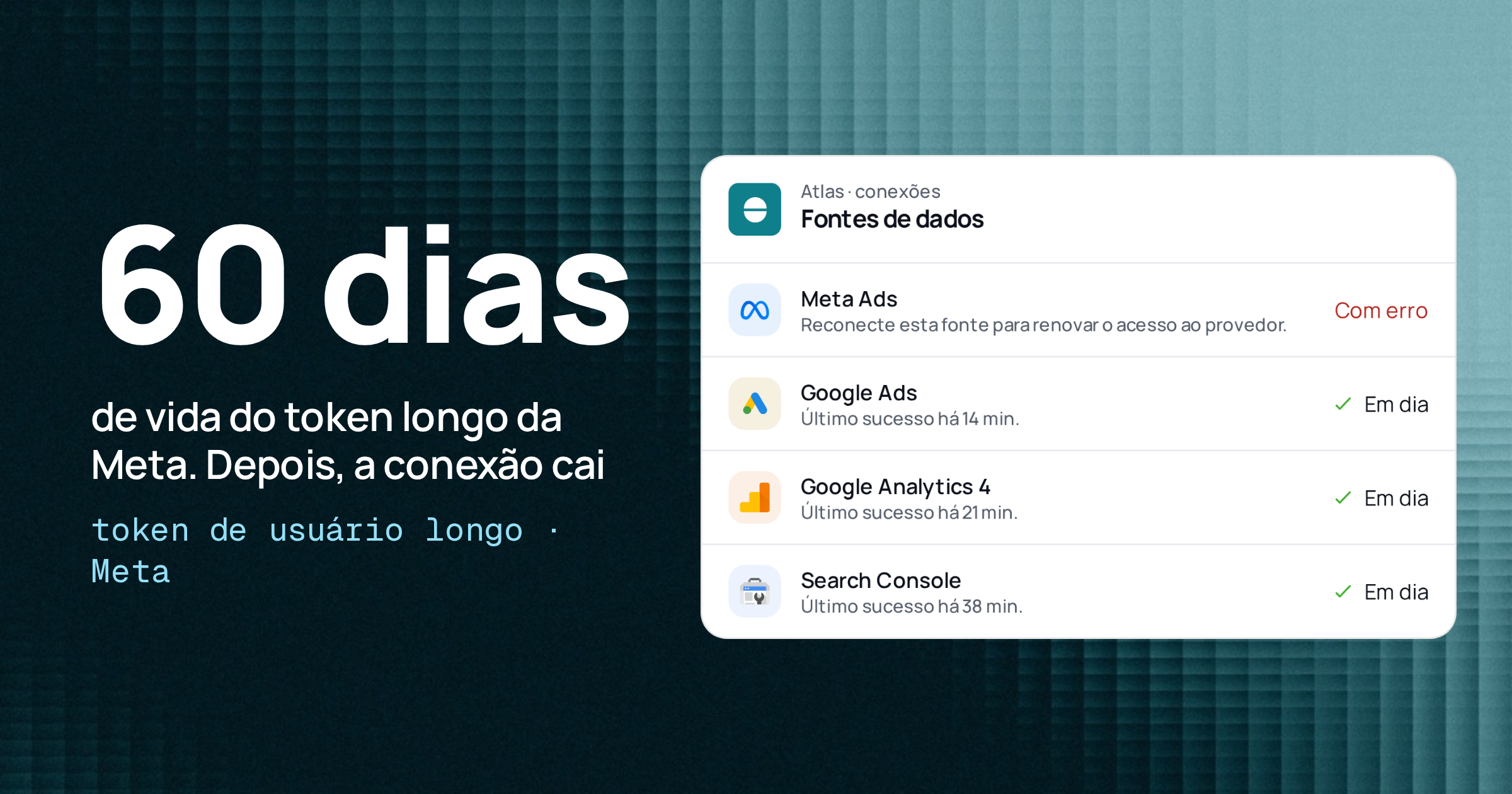
Tokens also expire, and different lifetimes explain why an integration "drops on its own":
Meta, short-lived user token
- Documented lifetime
- A few hours
- What usually breaks it
- Expires by default; the app exchanges it for a long-lived one
Meta, long-lived user token
- Documented lifetime
- About 60 days
- What usually breaks it
- End of term, password change, app removed
Meta, system user token
- Documented lifetime
- Never expires or 60 days, as generated
- What usually breaks it
- Revocation or removal of the system user
Google, refresh token
- Documented lifetime
- Until revoked
- What usually breaks it
- 6 months unused, time-based access, app in testing (7 days), revocation
| Token type | Documented lifetime | What usually breaks it |
|---|---|---|
| Meta, short-lived user token | A few hours | Expires by default; the app exchanges it for a long-lived one |
| Meta, long-lived user token | About 60 days | End of term, password change, app removed |
| Meta, system user token | Never expires or 60 days, as generated | Revocation or removal of the system user |
| Google, refresh token | Until revoked | 6 months unused, time-based access, app in testing (7 days), revocation |
Meta's system user exists precisely for server integrations: it is an identity of the portfolio, not of a person, and only gets the assets assigned to it. Meta itself recommends the expiring token as the safer practice and asks for extra care with the admin system user.
Disconnecting is not revoking
Removing a tool inside the tool itself ends its use of the access, but the token may remain valid on the platform side until it expires. To cut it off at the source:
- Google: at myaccount.google.com/linkedapps, pick the app, open the details and click Remove access. After that, the app can no longer access the account.
- Facebook: under Settings & privacy, Settings, Business integrations, click Remove next to the app.
- Meta, system user: the token can be revoked through the API, with immediate effect, or the system user can lose its assets in the portfolio.
In Relator Digital, platform tokens are encrypted with AES-256-GCM and the login callback (the OAuth state parameter) is signed with HMAC and expires in 30 minutes. Scopes vary: GA4 and Search Console are requested as read-only, HubSpot with read access to contacts, deals and companies, and for Meta Relator also requests ads_management, used to pause and activate campaigns from inside the app. For Google Ads the scope is the only one the API offers. Disconnecting an account in Relator marks the connection as revoked and pauses data collection; to invalidate the token on the platform, also remove the app in Google or in Facebook's business integrations.
Keep a checklist for when someone leaves
Forgotten access almost always starts with someone leaving. There are two situations, each with its own order.
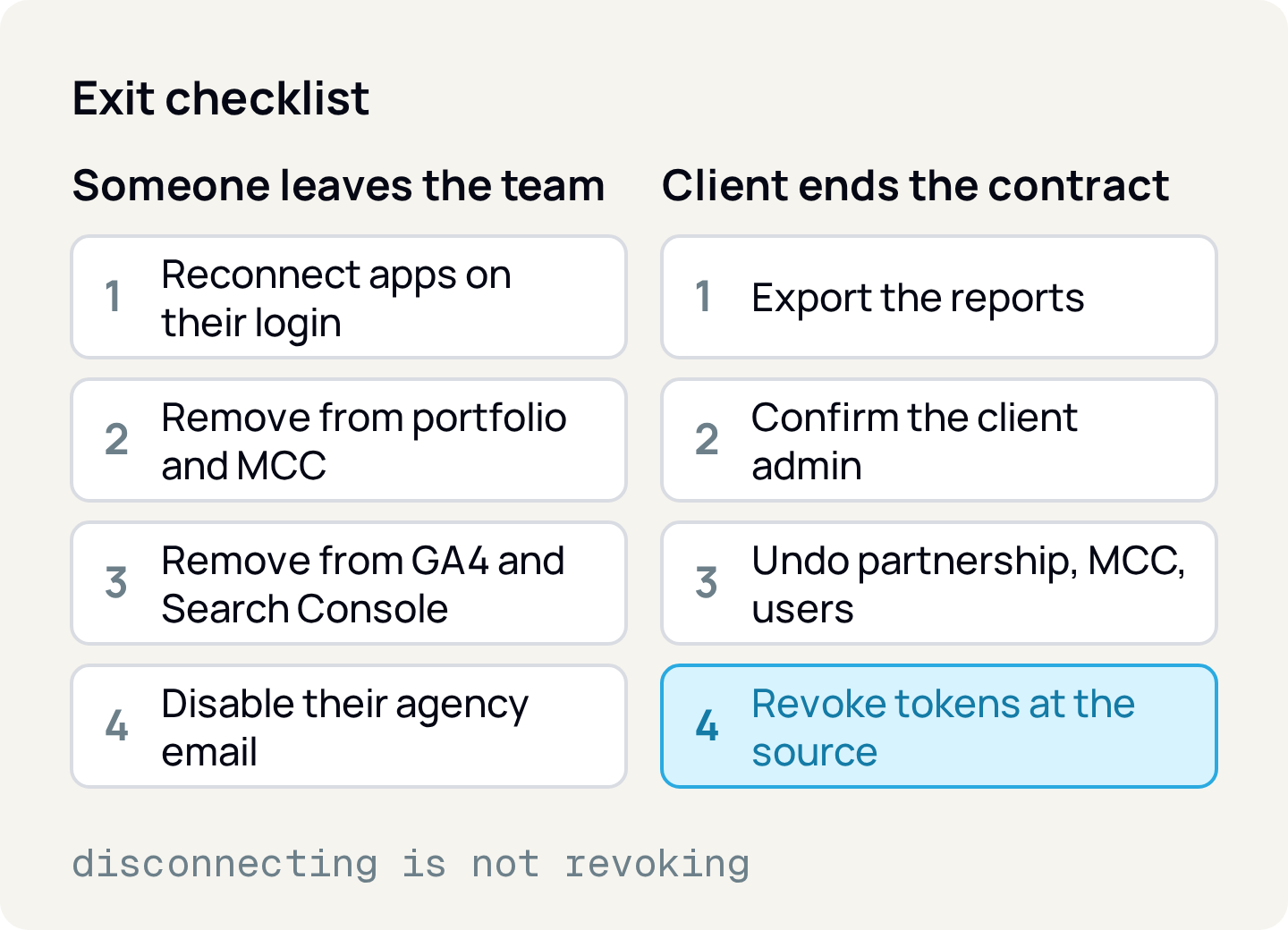
When someone leaves the team, start with the integrations. If the reporting tool was connected with that person's login, the token acts with their permissions; once you remove them, the integration stops. Reconnect it with a service account or a system user first. Then remove the person from the Meta portfolio, from the Google Ads manager account users, from the GA4 properties and Search Console, and finally from the agency's email account.
When the client ends the contract, hand over before leaving: export reports and notes that belong to the client, confirm they have their own admin on every asset, and only then undo the links (partnership in Meta, manager account link in Google Ads, users in GA4 and Search Console). Disconnect the agency tools that read those accounts and revoke the tokens at the source. If the contract defines what to do with data left with the agency, such as customer lists or exported leads, follow it and keep a record.
Audit access every quarter and remember LGPD
Keep a simple spreadsheet (asset, person or app, level, who authorized, date) and review it every quarter. In the review, look for people no longer on the team, levels higher than needed, old verified owners in Search Console and apps in the connections list that nobody recognizes.
Ad accounts hold personal data: customer lists uploaded for custom audiences, form leads and pixel events. Under Brazil's data protection law (LGPD), the company that decides about this data is usually the controller and the agency that processes it on its behalf is the processor, which must follow the controller's instructions. Both must adopt security measures against unauthorized access. Knowing who has access is the most basic of those measures. For how this applies to your case, talk to your legal team.
How to apply
- 1.Take inventory: for each client, list the assets (ad accounts, portfolio, GA4 property, Search Console) and who has access to each one, including apps.
- 2.Confirm the client owns every asset and has their own admin. If any asset sits in the agency's portfolio, plan the transfer.
- 3.Replace shared logins and personal accounts with partner access, manager account links and individual users.
- 4.Lower the levels: read-only for people who analyze, editing levels only for people who operate, admin with the client.
- 5.Connect tools with a service account or a system user, not an employee's login, and check the scopes requested.
- 6.Write both offboarding checklists and use them the next time someone leaves.
- 7.Put the quarterly audit on the calendar and also review the connections at myaccount.google.com/linkedapps and in Facebook's business integrations.
Sources
- Meta: give a partner access to assets in your business portfolio
- Meta: add people to a business portfolio and assign assets
- Meta for Developers: system users
- Meta for Developers: generate, refresh and revoke system user tokens
- Meta for Developers: long-lived tokens
- Meta for Developers: token errors and invalidation
- Facebook: edit or remove business integrations
- Google Ads: access levels
- Google Ads: about manager accounts
- Google Ads: link accounts to your manager account
- Google Ads API: OAuth scope
- Google Analytics: roles and data restrictions
- Search Console: manage users and permissions
- Google Identity: OAuth 2.0 and refresh token expiration
- Google: remove third-party app access to your account
- Brazilian General Data Protection Law (Law 13,709/2018)
About the author
João Vitor Moitinho
João Vitor Moitinho is the founder of Relator Digital. A computer engineer, he works on growth, measurement and martech, and writes here about what he learns building reports for performance agencies.
João Vitor Moitinho on LinkedInThis article is also available as Markdown, for agents and LLMs: view .md version