Click date or sale date? How each platform counts it
Google Ads dates a conversion by the click, GA4 by the sale. See why last month still changes, a worked example with checked math and how to close the month.


Contents
It depends on the platform. Google Ads records a conversion on the day of the ad click, and Google Analytics records it on the day the purchase happened. So a click in October that becomes a sale in November lands in October in one tool and in November in the other. The way out is to pick one date rule for the report, write it in the footer and wait the right amount of time before calling the month closed.
Each platform picks a different day for the same sale
When someone clicks an ad today and buys four days later, there are two candidate days for that sale: the click's and the purchase's. The platform has to pick one.
Google Ads. The official help page explains that conversions are calculated based on the time of the click, not the time of the conversion. The same help has columns that report by the time the conversion happened, such as "All conv. (by conv. time)", and suggests using them when comparing with third-party platforms.
Google Analytics. Google Ads Help contrasts the two with its own example: Google Ads reports a conversion from the date and time of the click that led to the action, and Analytics credits it to the day it actually occurred. In the page's example, a click on July 19 followed by a purchase on July 20 becomes a July 19 sale in Google Ads and a July 20 sale in Analytics.
Meta. The ad account Insights API documentation has an action_report_time parameter, which determines the report time of action stats. The listed values are impression, conversion, mixed and lifetime. The page's own example: if the person saw the ad on January 1 and converted on January 2, impression shows the conversion on January 1 and conversion shows it on January 2.
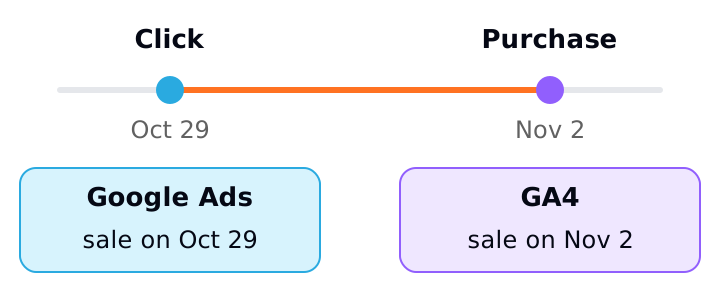
Neither difference is an error. It is a design choice, and each has its logic: by click date, you tie the sale to the spend that produced it; by purchase date, you tie the sale to the cash and store calendar.
A worked example with the math checked
The numbers below are hypothetical. A store spent R$ 4,000 on ads in October, with an average ticket of R$ 200 per sale. In October, the store's dashboard recorded 40 purchases from ads. Of those, 6 came from September clicks. In addition, 5 people who clicked in October only bought in November.
Purchase date (like GA4)
- How the sale is counted
- By the day of the sale
- October sales
- 40
- Revenue
- R$ 8,000
- ROAS
- 8,000 ÷ 4,000 = 2.00
Click date, on Oct 31
- How the sale is counted
- October clicks that already bought
- October sales
- 40 − 6 = 34
- Revenue
- R$ 6,800
- ROAS
- 6,800 ÷ 4,000 = 1.70
Click date, after the 5 purchases arrive
- How the sale is counted
- All October clicks
- October sales
- 34 + 5 = 39
- Revenue
- R$ 7,800
- ROAS
- 7,800 ÷ 4,000 = 1.95
| View | How the sale is counted | October sales | Revenue | ROAS |
|---|---|---|---|---|
| Purchase date (like GA4) | By the day of the sale | 40 | R$ 8,000 | 8,000 ÷ 4,000 = 2.00 |
| Click date, on Oct 31 | October clicks that already bought | 40 − 6 = 34 | R$ 6,800 | 6,800 ÷ 4,000 = 1.70 |
| Click date, after the 5 purchases arrive | All October clicks | 34 + 5 = 39 | R$ 7,800 | 7,800 ÷ 4,000 = 1.95 |
The math: 40 − 6 = 34 sales from October clicks bought still in October; 34 × R$ 200 = R$ 6,800; 34 + 5 = 39; 39 × R$ 200 = R$ 7,800. ROAS (revenue divided by spend) is 6,800 ÷ 4,000 = 1.70 on the 31st and 7,800 ÷ 4,000 = 1.95 once every sale arrived.
Note two things. First, the click-date view changed after the month closed: October's ROAS went from 1.70 to 1.95 without any campaign being touched. Second, the purchase-date view does not change for that reason, but it includes 6 sales from September clicks, paid for with September's budget, so the 2.00 ROAS looks higher than October's investment would justify.
Why last month still changes
The explanation is the lag between click and purchase. Google Ads Help on conversion time says conversions can be reported up to 90 days after the click, depending on the conversion window you chose. It also says recent performance can look worse than it is, because some of the people who clicked have not converted yet.
That is why the official recommendation for a complete analysis is that the date range end at least 30 days ago, or longer if your conversion window is longer. In a monthly report by click date, that means October's number only settles well after the 31st.
There is also processing delay. Google Ads Help recommends allowing 24 to 48 hours before comparing final results.
Which date rule to use in the report
There is no single right rule. There is the right rule for the question the report answers.
- "What return is this investment giving?" Use the click date (or impression date, on Meta). It groups the sale with the spend that produced it, and the price is waiting for the conversion window to close the month.
- "How much did we sell this month, and from where?" Use the purchase date. It reconciles with the store, the CRM and finance, and the price is that ROAS mixes one month's spend with other months' sales.
- Comparing platforms with each other. Pick the same date in both. In Google Ads, use the by-conversion-time columns to compare with GA4. On Meta, choose the
action_report_timevalue and use the same one in every query.
A short table spells out what each rule implies:
Return on investment
- Date
- Click or impression
- When the month closes
- After the conversion window
Sales for the month
- Date
- Purchase
- When the month closes
- A few days after the 31st
Compare Google Ads with GA4
- Date
- Conversion, in both
- When the month closes
- A few days after the 31st
| Question | Date | When the month closes |
|---|---|---|
| Return on investment | Click or impression | After the conversion window |
| Sales for the month | Purchase | A few days after the 31st |
| Compare Google Ads with GA4 | Conversion, in both | A few days after the 31st |
How to apply it
- 1.In the report footer, write which date each number uses: "Google Ads conversions by click date" or "by conversion date".
- 2.In Google Ads, when comparing with GA4, the store or the CRM, use the "by conv. time" columns instead of the default ones.
- 3.If you query Meta's API, set
action_report_timeexplicitly instead of relying on what the environment assumes, and use the same value across the whole history. - 4.For return on investment, close the month only after the conversion window and mark the number as "partial" until then.
- 5.When reconciling with the store, use the purchase date and remember that part of the sales comes from earlier months' spend.
- 6.Before investigating tracking, check whether the difference between sources comes from the date rule or from the attribution model, and explain the cause to the client.
- 7.Record in the metrics dictionary, next to the formula and the source, the date each metric uses. The article on the metrics dictionary shows how to build one with your client.
Sources
All checked on October 26, 2026. Left out, for lack of an official source read in full: which date Meta's Ads Manager uses by default, what the mixed and lifetime values mean, and how long attributed data keeps updating in GA4. The example numbers are hypothetical.
- Google Ads Help, Understand your conversion tracking data: conversions by click time, "by conv. time" columns, differences often up to 20% and a 24 to 48 hour delay.
- Google Ads Help, Find out how long it takes for your customers to convert: conversions up to 90 days after the click and a range ending 30 days ago.
- Google Ads Help, Create conversions from Google Analytics events in Google Ads: Google Ads uses the click date and Analytics the conversion date (July 19 and 20 example).
- Meta for Developers, Ad account Insights (Marketing API): the
action_report_timeparameter and the January 1 and 2 example.
About the author
João Vitor Moitinho
João Vitor Moitinho is the founder of Relator Digital. A computer engineer, he works on growth, measurement and martech, and writes here about what he learns building reports for performance agencies.
João Vitor Moitinho on LinkedInThis article is also available as Markdown, for agents and LLMs: view .md version